
- AddOns
- Categories
- Stand-Alone Addons
- Action Bar
- Auction House
- Bags, Bank, Inventory
- Buff, Debuff, Spell
- Casting Bars, Cooldowns
- Chat
- Combat
- Graphics, Artwork, Textures
- Layouts
- Map, Coords, Compasses
- Party, Guild
- Professions
- PvP, Warfronts
- Quest, Leveling, Reputation
- Raid Mods
- RolePlay, Music Mods
- Soul and Role Specific
- ToolTip
- Unit Frames
- Miscellaneous
- Compilations & Suites
- Developer & Utilities
- Optional
- Stand-Alone Addons
- Latest 200 Submissions
- Upload AddOn
- Community
- Forums
 »
Docker
PicturesFile Info
»
Docker
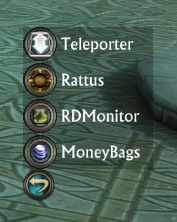
PicturesFile InfoUpdated: 06-25-13 02:23 AM Created: 09-21-12 10:42 AM Downloads: 2,325 Favorites: 38 MD5: Docker is a container for minimap icons.Docker
On first run, Docker will present an round button with an arrow icon, positioned in the center of the screen.
If the button is gray, then it is unlocked and can be moved around. Once it is in
a suitable place, click the Right Mouse Button to lock it into place - it will gain
some colour at this point.
Left clicking on the colourful icon will open the Docker configuration screen.
ADDON AUTHORS: See the included INFORMATION.txt on how to add support into your addon.
ADDON AUTHORS: 1.10r3 added an extra OPTIONAL parameter to the register function. See INFORMATION.txt for details.2.03r2
* Attempt at fixing Error: Docker/Docker_Main.lua:525: attempt to perform arithmetic on field ''sx'' (a nil value)
2.03r1
* Converted to new event system
* Completely redid the option handling system
1.10r4
- Removed code to reposition offscreen icons - was moving icons when global UI scale <> 1
+ Added command line /docker reset - to reset them instead
1.10r3
* Updated API with optional 3rd parameter (function to close any opened windows)
* Added new icon - cloud - toggles between FLOAT mode (can be repositioned on screen) to BAR mode - locks to an edge of the screen.
In BAR mode:
- if unlocked, then the icons can be dragged around screen and will snap to one of 3 zones : Top/Center/Bottom (or Left/Center/Right)
- Icons dragged to these locations will remember their locations and remain there.
- The growth direction arrow indicates which edge of the screen to attach to
1.10r2
* Changed mousebuttons around
* Hold left + Click right - toggles locked status
* If unlocked, can be dragged around by holding left and moving
* If locked, right click opens options popup
* Added options popup
1.10rb1
* Changed internal name to MINIMAPDOCKER from __DOCKER
* Exposed variable MINIMAPDOCKER.AUTOHIDE_DOCKED - set to false if you need to keep dock open, set to true when doneArchived Files (8)File NameVersionSizeAuthorDate2.03r172kBadelea06-20-13 03:07 AM1.10r432kBadelea10-08-12 05:37 AM1.10r432kBadelea10-08-12 05:35 AM1.10r332kBadelea10-05-12 06:46 AM1.10r226kBadelea09-22-12 11:05 AM1.10r227kBadelea09-22-12 08:16 AM1.10r1b13kBadelea09-21-12 01:24 PM1.10r13kBadelea09-21-12 10:42 AM

Comment Options  11-08-13, 04:50 PM
Forum posts: 0File comments: 11Uploads: 0That worked great, thanks.Quote:Originally Posted by adeleaOne thing you could try, is searching the addon code for the addon you dont want to use Docker, and look for "MINIMAPDOCKER" in the .lua files.
Then if you put the following near the top of those lua files (after anything that looks like local addon, data = ...)
local MINIMAPDOCKER = nil
That may work to override the normal behaviour on a per-addon basis.

 11-07-13, 01:50 AM
Claw of Regulos
11-07-13, 01:50 AM
Claw of Regulos
Forum posts: 22File comments: 285Uploads: 6It is all driven by the addon that is putting itself in Docker, rather than anything Docker is doing.Quote:Originally Posted by wrinkLove the addon and have been using it for quite a while now. However, I was wondering if you had any plans on adding an option that would allow us to pick and choose which addons were contained within the docker. There are a couple addon icons that I'd like to remain outside of the docker, but I don't know how to keep them out with the docker addon enabled.
In order to allow Docker to do its thing, there are several things the addon being added must do (or rather not do), and once this choice is made, there isnt anything that could be done to undo the choice.
One thing you could try, is searching the addon code for the addon you dont want to use Docker, and look for "MINIMAPDOCKER" in the .lua files.
Then if you put the following near the top of those lua files (after anything that looks like local addon, data = ...)
local MINIMAPDOCKER = nil
That may work to override the normal behaviour on a per-addon basis.
11-04-13, 03:46 PM
Forum posts: 0File comments: 11Uploads: 0Love the addon and have been using it for quite a while now. However, I was wondering if you had any plans on adding an option that would allow us to pick and choose which addons were contained within the docker. There are a couple addon icons that I'd like to remain outside of the docker, but I don't know how to keep them out with the docker addon enabled.
07-08-13, 03:10 PM
Claw of Regulos
Forum posts: 22File comments: 285Uploads: 6Are you using it in FLOAT mode, with AUTOHIDE enabled?Quote:Originally Posted by fostotIt seems that with Teleporter, Rifter it works, but say you click on Gadget to pop it's buttons up, if you move outside of the Docker strip like down to Unlock in Gadget it hides everything so you can't get to it. It's the only reason I can't use this addon.
I dont really like float mode, I use it in Docked mode across the top of the screen.
I'll have to have a think to see what I can do about float modeLast edited by adelea : 07-08-13 at 03:10 PM.
07-08-13, 01:55 PM
Zombie
Forum posts: 3File comments: 28Uploads: 0It seems that with Teleporter, Rifter it works, but say you click on Gadget to pop it's buttons up, if you move outside of the Docker strip like down to Unlock in Gadget it hides everything so you can't get to it. It's the only reason I can't use this addon.
06-23-13, 09:00 AM
Claw of Regulos
Forum posts: 22File comments: 285Uploads: 6Oh, you wanted it to actually appear in same little window as the other system buttons?Quote:Originally Posted by EpitahYes, I can; however it's kind of buggy for me. I don't like how it functions. But I don't want to complain. It's a great mod, I found something that works for me, I just wish it could be added to the menu bar, instead of having extra buttons on the screen. Maybe it's not available in the LUA yet.
We cant do that - there is very little we CAN do with the default UI frames!
06-23-13, 05:38 AM
Bomani Harbinger
Forum posts: 6File comments: 26Uploads: 1Yes, I can; however it's kind of buggy for me. I don't like how it functions. But I don't want to complain. It's a great mod, I found something that works for me, I just wish it could be added to the menu bar, instead of having extra buttons on the screen. Maybe it's not available in the LUA yet.Quote:Originally Posted by adelea
Could you not achieve this by:
Placing the Docker arrow button next to the menu bar, and locking it.
Bringing up the configuration menu, and selecting:
FLOAT
Setting the direction to (presumably) left
Ticking autohide
This way, when you put the mouse over the docker icon, all the docked icons would pop up, extending the menu bar, for you to choose the one you want.
06-21-13, 01:12 PM
Claw of Regulos
Forum posts: 22File comments: 285Uploads: 6Could you not achieve this by:Quote:Originally Posted by EpitahHello and thank you for this great addon.
I need to ask, is there a way to put these on the menu bar on the default UI, instead of moving them around? It doesn't fit with the UI very well. I suppose it wouldn't be so bad if there was 'atleast' a feature to have them only show up on mouse over.
Those are the only 2 features I am requesting. This is still very helpful. I just wish it was easier to make it fit with the UI.
Placing the Docker arrow button next to the menu bar, and locking it.
Bringing up the configuration menu, and selecting:
FLOAT
Setting the direction to (presumably) left
Ticking autohide
This way, when you put the mouse over the docker icon, all the docked icons would pop up, extending the menu bar, for you to choose the one you want.
06-21-13, 12:38 PM
Bomani Harbinger
Forum posts: 6File comments: 26Uploads: 1Hello and thank you for this great addon.
I need to ask, is there a way to put these on the menu bar on the default UI, instead of moving them around? It doesn't fit with the UI very well. I suppose it wouldn't be so bad if there was 'atleast' a feature to have them only show up on mouse over.
Those are the only 2 features I am requesting. This is still very helpful. I just wish it was easier to make it fit with the UI.
05-20-13, 02:38 AM
Claw of Regulos
Forum posts: 22File comments: 285Uploads: 6Re: Docs?
There is one slash command:Quote:Originally Posted by ValetharIs there any documentation for this addon? Besides what's on the description page?
The icon for Docker vanished on one of my characters, and I can't figure out how to get it to reappear. The 'docker reset' command doesn't recall it, and even deleting the Docker information from my addons folder for that character doesn't make it reappear either.
I'm sure there are probably other / commands, but I've no idea what they'd be, and there's nothing in the ZIP file itself.
/docker reset
Which attempts to reposition the icon if it is offscreen - though looking at the code, it doesnt move it at that point, so a /reloadui would be needed.
Failing that:
/script Docker_Settings = nil
/reloadui
That should clear out all settings back to the defaults.
I have to admit I dont like the way I handled the configuration in Docker - and its on my list of things to redo.
05-19-13, 05:29 PM
Forum posts: 0File comments: 2Uploads: 0Docs?
Is there any documentation for this addon? Besides what's on the description page?
The icon for Docker vanished on one of my characters, and I can't figure out how to get it to reappear. The 'docker reset' command doesn't recall it, and even deleting the Docker information from my addons folder for that character doesn't make it reappear either.
I'm sure there are probably other / commands, but I've no idea what they'd be, and there's nothing in the ZIP file itself.
10-05-12, 07:03 AM
Claw of Regulos
Forum posts: 22File comments: 285Uploads: 6What happens with 1.10r3 and IF the addon supports it (Teleporter and Rifter do), when you mouseover a different docked icon, it will try and close any existing popups.Quote:Originally Posted by porscheWhat about leaving transparent space at the top/side of the popout stack so you can move clearly out one addon that popped open (hopefully catching your mouseout) and then down into the other beside it. Alternatively, make the docker button be a toggle versus a transient. ie. click once to show the stack/icons, click a 2nd time to close it.Quote:Originally Posted by adeleaIf you can think of a better way to do this, then I welcome the suggestions!
10-01-12, 08:44 PM
Forum posts: 0File comments: 10Uploads: 0What about leaving transparent space at the top/side of the popout stack so you can move clearly out one addon that popped open (hopefully catching your mouseout) and then down into the other beside it. Alternatively, make the docker button be a toggle versus a transient. ie. click once to show the stack/icons, click a 2nd time to close it.Quote:Originally Posted by adeleaIf you can think of a better way to do this, then I welcome the suggestions!
10-01-12, 09:21 AM
Claw of Regulos
Forum posts: 22File comments: 285Uploads: 6The behaviour of the popups is down to the addons themselves, not docker.Quote:Originally Posted by porscheWould be nice if going from one item to another hid the previous one. Two open subitems at once is hugely confusing and awkward.
However, since the only released addons that suppport it are mine, I can do something about it - but what?
The API that handles MouseIn/Out is sort of broken - if you have a window with some icons on it, then moving over the icon causes a mouseOUT event for the parent window.
This makes detecting the mouse leaving the window a non-trivial exercise, so what I end up doing is using something else to see if the mouse pointer is still inside the box area, and hide the popup if it isnt - that means if you move the mouse in such a way as to open two, that overlap, then there will be common area that covers both.
If you can think of a better way to do this, then I welcome the suggestions!
09-30-12, 08:47 PM
Forum posts: 0File comments: 10Uploads: 0Would be nice if going from one item to another hid the previous one. Two open subitems at once is hugely confusing and awkward.
- Categories







Riftui
AddOn Sites

© 2022 MMOUI