
- AddOns
- Categories
- Stand-Alone Addons
- Action Bar
- Auction House
- Bags, Bank, Inventory
- Buff, Debuff, Spell
- Casting Bars, Cooldowns
- Chat
- Combat
- Graphics, Artwork, Textures
- Layouts
- Map, Coords, Compasses
- Party, Guild
- Professions
- PvP, Warfronts
- Quest, Leveling, Reputation
- Raid Mods
- RolePlay, Music Mods
- Soul and Role Specific
- ToolTip
- Unit Frames
- Miscellaneous
- Compilations & Suites
- Developer & Utilities
- Optional
- Stand-Alone Addons
- Latest 200 Submissions
- Upload AddOn
- Community
- Forums
 »
Montage's Killing Blow Indicator
PicturesFile Info
»
Montage's Killing Blow Indicator
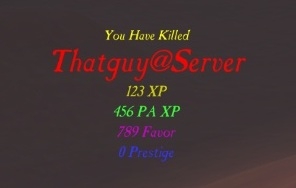
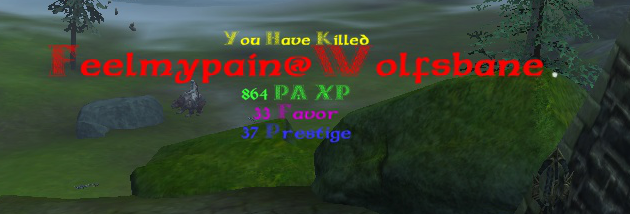
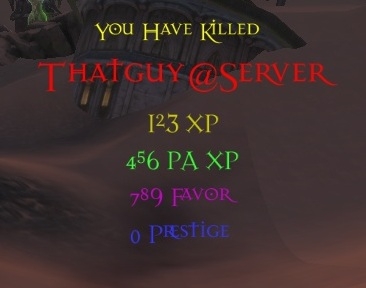
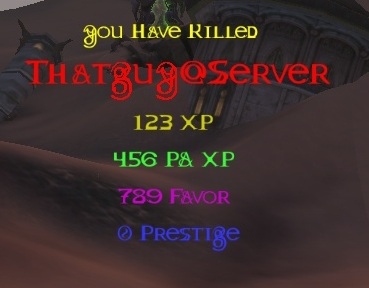
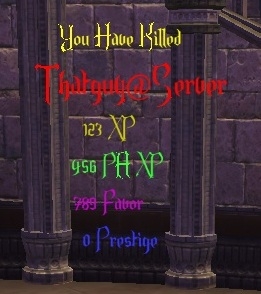
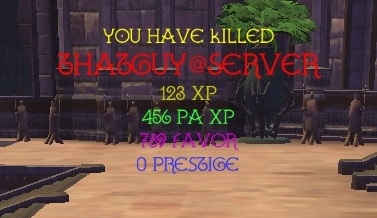
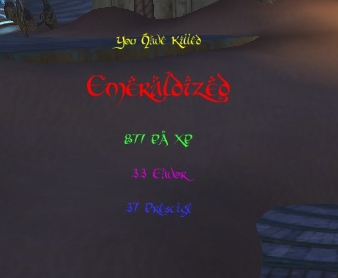
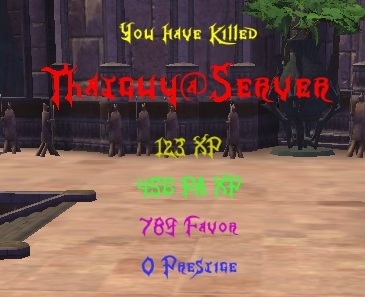
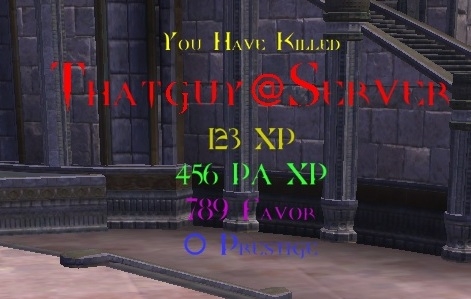
PicturesFile InfoUpdated: 01-23-14 09:24 AM Created: 01-13-13 12:15 AM Downloads: 3,426 Favorites: 3 MD5: Pops up a message when you get a killing blow telling you who you got a killing blow on, how much XP, PA XP, Favor, and Prestige you were awarded as well.Montage's Killing Blow Indicator
Update!!!
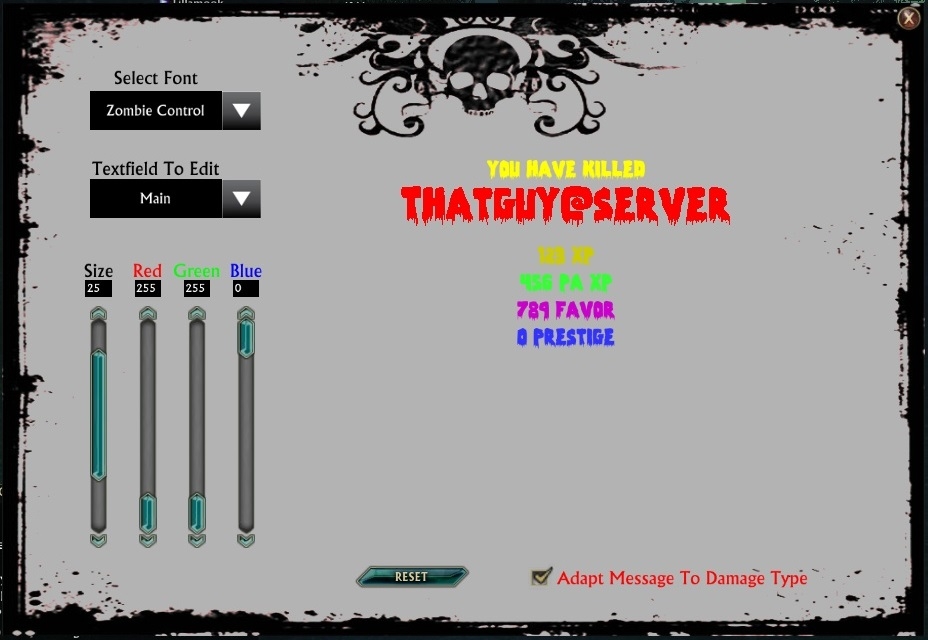
Saves can now have it's colors, size, font, and location edited. Click on the tab on top of the UI, click on the Saves tab, and make it how you like!
Added new fonts! Most Wasted, Silent Hill E, Celexa, Face Your Fears, and Halo!
There is a button to open the Edit UI that is towards the center of your screen by default. Right click and hold to move the button!
The Edit UI can also be moved with right click and hold!
FONT OPTIONS
Cas_antn.ttf (default)

Casanti.ttf

celticmd.ttf

DARK11.ttf

Dragon_Master.ttf

ENDOR.ttf

GALLA.ttf

hobbiton.ttf

Kingdom_Hearts.ttf

NIGHTMARE.ttf

FiddumsFamily.ttf

dpquake.ttf

KingthingsXander.ttf
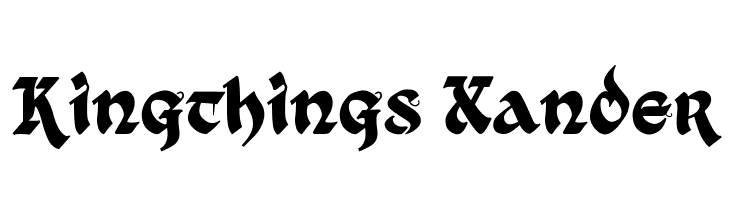
KnightsQuest.ttf

VTCGoblinHand.ttf

Bard.ttf
AngloSaxon.ttf
DANIELA.ttf
demonpriest.ttf
demonpriestcondital.ttf
grimghost.ttf
HARNGTON.ttf
Soul_of_Holitter.ttf
Tolky.ttf
VIKING.ttf
zombiecontrol.ttf1.0
Initial Release
1.1
Added XP, PA XP, Favor, and Prestige notifications to go with the "You Have Killed So and So" message
Made it so that all text can be resized and have its color changed
Added a way to put settings back to default
1.1b
Fixed errors with Favor Text due to the fact that mkbi isn't mbki or vice versa.
1.2
SetFont is working again added tons of fonts to choose from
1.3
Added assistance to editing by adding /mkbi edit and /mkbi done to show the text for editing
Removed brother_of_metal.ttf since it doesn't show numbers
Added FiddumsFamily.ttf, dpquake.ttf, KingthingsXander.ttf, KnightsQuest.ttf, VTCGoblinHand.ttf
1.4
Hopefully fixed issues for PA capped players having a nil variable
Added Bard.ttf, AngloSaxon.ttf, DANIELA.ttf, demonpriest.ttf, demonpriestcondital.ttf, grimghost.ttf HARNGTON.ttf, Soul_of_Holitter.ttf, Tolky.ttf, VIKING.ttf, zombiecontrol.ttf
1.5
Fixed an issue caused by prestige rank no longer being returned as a string
Added the ability to toggle messages that adapt to the damage type with /mkbi adapt
Added saves, though they are in a fairly beta state! It's fucntional!
1.6
Added Edit UI
Added Edit UI button
Fixed overlap of Celtic font
1.7
Using "CENTER" instead of math to center text
Fixed issue in GreaterThanFiftyText that incorrectly made changes on favor text and not prestige text if player wasn't prestige level 50
Revamped function CenterText to use "CENTER"
Added function HideKBText
Added function ShowKBText which is used for moving text
Removed EditText function as that is handled by MKBI Setting UI.lua
Changed from setting text to empty string to using RebuildText to reset textfields for killing blows
Changed moving from a square box to also show the text. Hides menu when displayed, shows menu when hidden.
Increased max Prestige Level to 90
Changed Saves to hide KB Text
Changed KBs to hide Save text
Changed Saves to only work on targets in combat
Added an Enable Saves check box and the saved variable enable_saves
Added a test functionality for testing KB settings (not saves currently)
Added an Up Time scrollbar with increments of 0.1
Changed size scrollbar to be in increments of 1
1.7b
Fixed issue caused by the accidental deletion of the condition that the editing ui's position was not already in the saved variables
1.8
Added function to sort fonts in the Font Menu (what a pain haha)
Added the fonts Most Wasted, Silent Hill E, Celexa, Face Your Fears, and Halo
Added ability for Saves to have own font, sizes, and colors
Changed saves to have their own location
Added tabs to configure KBs or Saves
1.8b
Hopefully fixed an issue with nil values. I found some save variables that were not present in Reset to Default.
1.8c
Missed a fix in 1.8b that fixed an issue with textfield options not being present after configuring Saves and then switching back to killing blowsOptional Files (0)
Archived Files (12)File NameVersionSizeAuthorDate1.82MBMontage01-16-14 12:59 AM1.7b1MBMontage12-25-13 12:34 PM1.71MBMontage12-23-13 03:13 PM1.6b1MBMontage07-16-13 11:03 PM1.61MBMontage07-16-13 10:03 PM1.51MBMontage06-24-13 11:26 PM1.4743kBMontage01-25-13 11:44 PM1.3381kBMontage01-24-13 08:57 PM1.2286kBMontage01-16-13 09:50 PM1.1b59kBMontage01-13-13 11:40 PM1.159kBMontage01-13-13 04:14 PM1.057kBMontage01-13-13 12:15 AM

Comment Options  03-13-14, 09:55 AM
Zombie
03-13-14, 09:55 AM
Zombie
Forum posts: 2File comments: 65Uploads: 7I will no longer be updating this Addon as I have gotten tired of Trion's half assed PvP content. If any would like the continue this addon feel free. Take care!

 07-16-13, 10:50 PM
Zombie
07-16-13, 10:50 PM
Zombie
Forum posts: 2File comments: 65Uploads: 7So I release tired and forgot to implement the ability to move the actual pop up text. Fix incoming soon!
06-24-13, 11:33 PM
Zombie
Forum posts: 2File comments: 65Uploads: 71.5 is out and it should fix the problem!
1.5 also adds the functionality to make the message adaptive to the damage type with /mkbi adapt
1.5 gives notifications for Saves as well now! It's functional, but it's pretty basic. I'd love to hear feedback on what you'd like to see for Saves!
06-24-13, 09:36 PM
Zombie
Forum posts: 2File comments: 65Uploads: 7Found the problem! Inspect.Prestige was no longer returning rank as a string!
06-18-13, 04:49 PM
Zombie
Forum posts: 2File comments: 65Uploads: 7Weird, that was an old bug that I haven't experience myself or gotten a report about for a while. I'll look into it and see if anything has changed.Quote:Originally Posted by corthreatThe addon currently stops working once you hit Rank 50 on Prestige.
Either the killing blows don't show up anymore, or the names stick on your screen forever. They still get updated on successfull kill, but they never disappear. A Reset hasn't helped.
I wonder if it has to do with prestige cap and players being less than level 60.
edit: I've got some improvements for this coming out soon-ish (life dependent) so if I find the issue I'll get it out quick!Last edited by Montage : 06-18-13 at 04:51 PM.
06-18-13, 02:04 AM
Forum posts: 0File comments: 5Uploads: 0The addon currently stops working once you hit Rank 50 on Prestige.
Either the killing blows don't show up anymore, or the names stick on your screen forever. They still get updated on successfull kill, but they never disappear. A Reset hasn't helped.
01-26-13, 12:49 AM
Zombie
Forum posts: 2File comments: 65Uploads: 7With any luck I fixed your issue. Since I don't have a PA capped toon I'm coding blind. Let me know of any issues!
01-25-13, 04:29 PM
Zombie
Forum posts: 2File comments: 65Uploads: 7I might need to put in a catch for max pa people. Should be simple enough to implement. I'll try to get the fix out this weekend!Quote:Originally Posted by sursaNope, level 60. Rank 50 and max PA, if that helps at all. Thanks Montage!!Quote:Originally Posted by MontageAre you below 50? If so I hope to have that mistake fixed soon.Quote:Originally Posted by sursaBeen waiting for a new addon like this since the last ones out there quit working.
sad to say, this throws up an error as soon as i get a killing blow. I didnt modify anything. just installed and went to test it out.
Error: MontsKBIndicator/Montage's Killing Blow Indicator.lua:265: attempt to perform arithmetic on upvalue 'mkbi_currpa' (a nil value)
In MontsKBIndicator / Look how big my e-peen is, event Event.Combat.Death
stack traceback:
MontsKBIndicator/Montage's Killing Blow Indicator.lua:265: in function 'MaxLevelText'
MontsKBIndicator/Montage's Killing Blow Indicator.lua:253: in function <MontsKBIndicator/Montage's Killing Blow Indicator.lua:228>
this same thing happens with the 2 latest versions. I also tried the oldest, 1.0 version i think it is, and as soon as i enabled the addon it threw an error.
I figured that if you were maxed out you would always just end up with a change of 0 PA XP but that may not be the case.
01-25-13, 02:41 PM
Forum posts: 0File comments: 2Uploads: 0Nope, level 60. Rank 50 and max PA, if that helps at all. Thanks Montage!!Quote:Originally Posted by MontageAre you below 50? If so I hope to have that mistake fixed soon.Quote:Originally Posted by sursaBeen waiting for a new addon like this since the last ones out there quit working.
sad to say, this throws up an error as soon as i get a killing blow. I didnt modify anything. just installed and went to test it out.
Error: MontsKBIndicator/Montage's Killing Blow Indicator.lua:265: attempt to perform arithmetic on upvalue 'mkbi_currpa' (a nil value)
In MontsKBIndicator / Look how big my e-peen is, event Event.Combat.Death
stack traceback:
MontsKBIndicator/Montage's Killing Blow Indicator.lua:265: in function 'MaxLevelText'
MontsKBIndicator/Montage's Killing Blow Indicator.lua:253: in function <MontsKBIndicator/Montage's Killing Blow Indicator.lua:228>
this same thing happens with the 2 latest versions. I also tried the oldest, 1.0 version i think it is, and as soon as i enabled the addon it threw an error.
01-25-13, 01:44 PM
Zombie
Forum posts: 2File comments: 65Uploads: 7After a second look I already fixed this. mkbi_currpa should be 0 if nothing comes up from it not nil. That's really odd. I'll see what I can find out!Quote:Originally Posted by MontageAre you below 50? If so I hope to have that mistake fixed soon.Quote:Originally Posted by sursaBeen waiting for a new addon like this since the last ones out there quit working.
sad to say, this throws up an error as soon as i get a killing blow. I didnt modify anything. just installed and went to test it out.
Error: MontsKBIndicator/Montage's Killing Blow Indicator.lua:265: attempt to perform arithmetic on upvalue 'mkbi_currpa' (a nil value)
In MontsKBIndicator / Look how big my e-peen is, event Event.Combat.Death
stack traceback:
MontsKBIndicator/Montage's Killing Blow Indicator.lua:265: in function 'MaxLevelText'
MontsKBIndicator/Montage's Killing Blow Indicator.lua:253: in function <MontsKBIndicator/Montage's Killing Blow Indicator.lua:228>
this same thing happens with the 2 latest versions. I also tried the oldest, 1.0 version i think it is, and as soon as i enabled the addon it threw an error.
01-25-13, 01:37 PM
Zombie
Forum posts: 2File comments: 65Uploads: 7Are you below 50? If so I hope to have that mistake fixed soon.Quote:Originally Posted by sursaBeen waiting for a new addon like this since the last ones out there quit working.
sad to say, this throws up an error as soon as i get a killing blow. I didnt modify anything. just installed and went to test it out.
Error: MontsKBIndicator/Montage's Killing Blow Indicator.lua:265: attempt to perform arithmetic on upvalue 'mkbi_currpa' (a nil value)
In MontsKBIndicator / Look how big my e-peen is, event Event.Combat.Death
stack traceback:
MontsKBIndicator/Montage's Killing Blow Indicator.lua:265: in function 'MaxLevelText'
MontsKBIndicator/Montage's Killing Blow Indicator.lua:253: in function <MontsKBIndicator/Montage's Killing Blow Indicator.lua:228>
this same thing happens with the 2 latest versions. I also tried the oldest, 1.0 version i think it is, and as soon as i enabled the addon it threw an error.
01-24-13, 08:42 PM
Forum posts: 0File comments: 2Uploads: 0Been waiting for a new addon like this since the last ones out there quit working.
sad to say, this throws up an error as soon as i get a killing blow. I didnt modify anything. just installed and went to test it out.
Error: MontsKBIndicator/Montage's Killing Blow Indicator.lua:265: attempt to perform arithmetic on upvalue 'mkbi_currpa' (a nil value)
In MontsKBIndicator / Look how big my e-peen is, event Event.Combat.Death
stack traceback:
MontsKBIndicator/Montage's Killing Blow Indicator.lua:265: in function 'MaxLevelText'
MontsKBIndicator/Montage's Killing Blow Indicator.lua:253: in function <MontsKBIndicator/Montage's Killing Blow Indicator.lua:228>
this same thing happens with the 2 latest versions. I also tried the oldest, 1.0 version i think it is, and as soon as i enabled the addon it threw an error.
01-18-13, 10:22 AM
Zombie
Forum posts: 2File comments: 65Uploads: 7I'm trying to implement a way to show the text to edit it, but due to some (I'm guessing) internal bugs it's not working yet.
01-13-13, 11:27 AM
Zombie
Forum posts: 2File comments: 65Uploads: 7I apologize for putting incomplete slash commands on here. I've corrected them now. That's what I get for uploading while half asleep.
- Categories








Riftui
AddOn Sites

© 2022 MMOUI