
- AddOns
- Categories
- Stand-Alone Addons
- Action Bar
- Auction House
- Bags, Bank, Inventory
- Buff, Debuff, Spell
- Casting Bars, Cooldowns
- Chat
- Combat
- Graphics, Artwork, Textures
- Layouts
- Map, Coords, Compasses
- Party, Guild
- Professions
- PvP, Warfronts
- Quest, Leveling, Reputation
- Raid Mods
- RolePlay, Music Mods
- Soul and Role Specific
- ToolTip
- Unit Frames
- Miscellaneous
- Compilations & Suites
- Developer & Utilities
- Optional
- Stand-Alone Addons
- Latest 200 Submissions
- Upload AddOn
- Community
- Forums
 »
MereHealingFrames
PicturesFile Info
»
MereHealingFrames
PicturesFile InfoUpdated: 10-12-15 11:19 AM Created: 03-12-12 12:21 AM Downloads: 11,467 Favorites: 27 MD5: The frames are now at the point they're configurable by others (I won't say easy to configureMereHealingFrames

There's config UI available by running:
/mhf config
to bring up the config dialog.
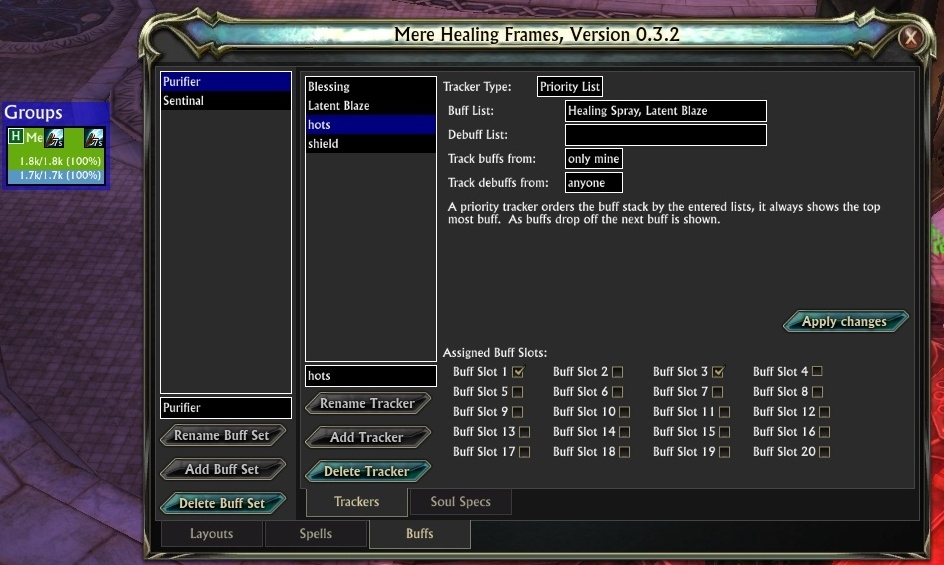
Basic buff tracking is in (stacks and timers should work) The buff/debuff lists are a priority ordered list. IE the first buff will be shown that is active from the list.
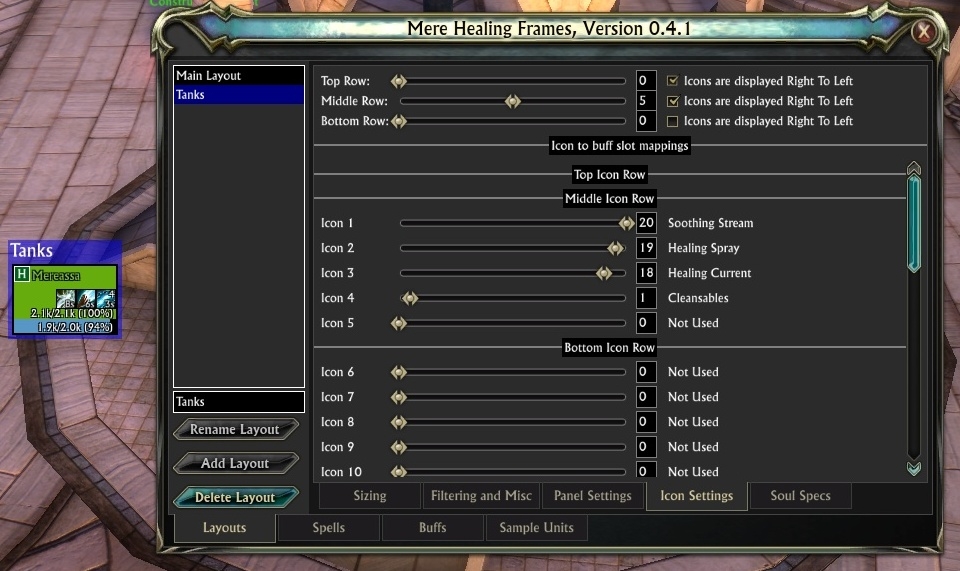
The Buff Slots are harder to explain, currently slots 1 is Top Right, then slot 5 is on the left. Eventually you'll be able to map icons to any buff slot you want. EG the tank frame is larger, and you can fit some more buff icons, then you can configure them as higher slots.
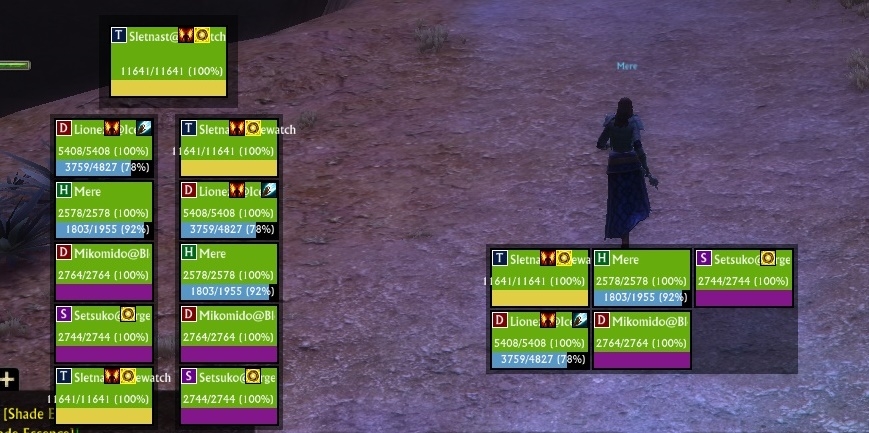
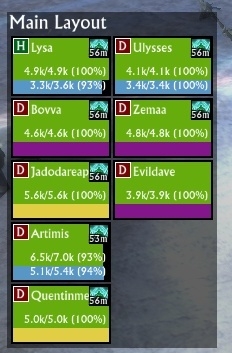
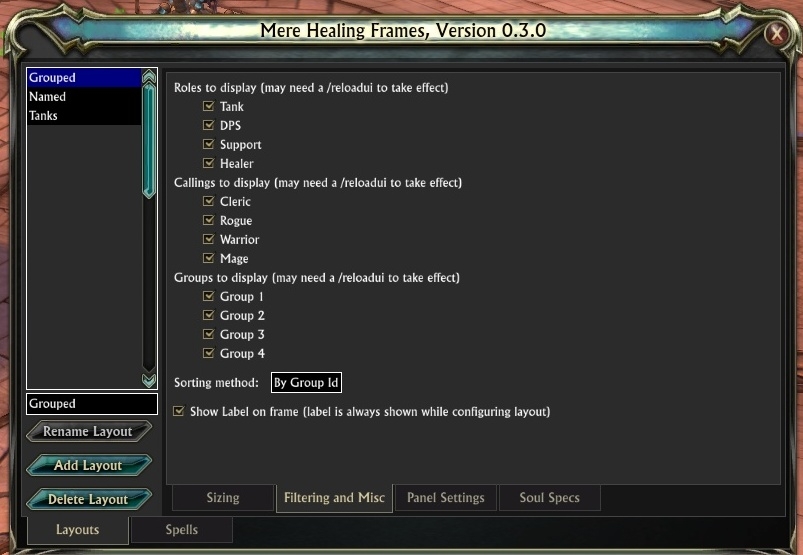
The frames support multiple layouts, along with many filter options, you can create frames that a filter based on:- calling (warrior, rogue, mage, cleric)
- role (dps, tank, support, healer)
- grouping (group 1-4)
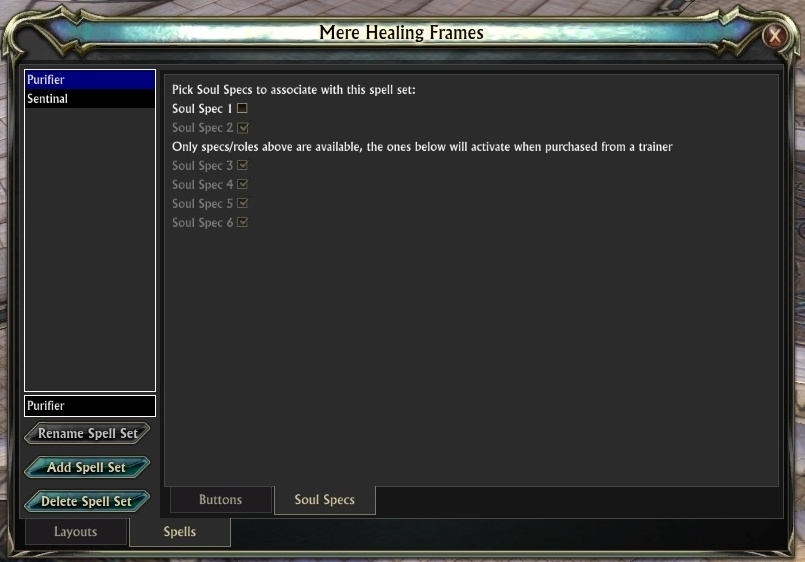
Spell sets can be created for each spec, or shared between specs. (this functionality needs adding to the layouts as well)
To move a layout around you should be able to drag it's border to place it in a new location.
To enable debug spam run:
/mhf debug -l 5
This will enable some spammy tracing. Note this setting isn't saved.
Spells are configured using:
/mhf spell
more help can be seen with:
/mhf spell -?
Known options:
-l (--list): list current spell settings
-b (--button): mouse button (left, right, middle, four, five, up, down) (string)
-m (--modifier): modifier to apply (alt, shift, ctrl) (string)
-s (--spell): spellname (string)
-t (--target): target
-c (--custom): custom, not yet implemented (string)
-r (--reset): resets all mouse bindings
--mere: Setup Mere's test spells
To reconfigure current spells for your current spec, you can create a macro that contains the desired entries, and use it for reconfiguring spells, eg:
/mhf spell --reset
/mhf spell -b left -s "Healing Spray"
/mhf spell -b left -m ctrl -s "Healing Breath"
/mhf spell -b right -s "Restorative Flame"
/mhf spell -b right -m ctrl -s "Healing Grace"
/mhf spell -b middle -s "Cauterize"
/mhf spell -b four -s "Ward of the Ancestors"
/mhf spell -b five -s "Searing Transfusion"
/mhf spell -b up -s "Latent Blaze"
/mhf spell -b down -s "Sterilize"
Adding -n "set name" will update the specified spell set. (the set needs creating through the config UI)
Colours can be reconfigured with (eventually I'll put a UI on this):
/mhf colours -?
Note that the colour names may not mean much without looking at the code.
Thanks also to the makers of the following libraries:- LibGetOpt
- LibSimpleWidgets
- LibString
- LibUnitChange
- LibVersionCheck
I also used to include:But no longer do so.Full git log can be found on: http://git.riftui.com/?a=summary&p=MereHealingFrames
Version 0.4.38
Add support for primalist (colour might not be quite right)
This should fix the warnings from the last few people using MHF that get emailed by rift for addon errors.
Note the new version updates the saved variables from previous releases to include primalist if a layout's calling filter included all callings. Once updated it won't change the setting again.
Version 0.4.37
Fix previous change to display an error when a change occurs while in combat.
Version 0.4.36
Ask the watchdog to be quiet when processing raid changes, on some systems it triggers a performance warning.
Version 0.4.35
A few minor fixes to some exceptions.
Version 0.4.34
Fix attempt to index field ''PlayerEvents'' (a nil value) errors
Version 0.4.33
Hopefully fix performance warning from ScanAvailableSpecs, it may not help though, as I suspect that it's the time taken to build the config ui that's hurting.
Version 0.4.32
A mixture of changes are present in this build.
Tweaked some code paths to try and stop letting people do things while in combat that will break.
Start of a new event based model for moving data internally. This is hooked up to quite a few things, and longer term everything will be event driven.
Colours are more dynamic, changing some colours on the command line is likely to update them straight away. Not all colours are hooked up this way yet.
Version 0.4.31
Bug fix to /mhf spell --list
Update LibVersionCheck to 0.03
Version 0.4.30
Add ability to configure role coloured health bars.
Version 0.4.29
Add ability to configure the anchor point of layouts
Improved command line usage to display when no params are passed to subcommands.
Version 0.4.28
Add support for configuring bordersize on panels
Add support for using libversioncheck to help keep people up-to-date with the latest version.
Version 0.4.27
Fix some issues with unit tracking.
Version 0.4.26
Support for 20 souls/roles is now present in the ui. I may look at adding the ability to copy things between the spell/buff sets, as 20 of them won't be easy to manage (I've no idea what anyone will do with 20!)
Switch to directly use libunitchange rather than safes raid manager, mainly because safes raid manager hasn't been updated for some time, and will break with rift 2.4 (as kbm uses a different library now) From my testing I believe I've tested adding/removing members of the raid in various configurations and sequences and things appear to update correctly.
Switch shadowed text to use rift 2.3 glows (hopefully they look ok, and might be less overhead on the system)
Version 0.4.25
Fix a critical issue with 0.4.24, clicking doesn't cast spells (I'll blame the sunshine for that bug)
Version 0.4.24 --- BROKEN DO NOT USE
Switch to using new event API.
More optimization work, hopefully less performance warnings. May also be less CPU usage when running around.
Version 0.4.23
More optimizations targeting relaying panels.
Version 0.4.22
Fix a performance warning for PlanarMax events, it was used at one time to determine if the player was fully loaded, but that's since changed.
Optimize a number of code paths, particularly around health, mana, energy and power updates.
Also fix a few debug messages to pass args into debug, so if tracing is not enabled the debug line has less overhead. Previously they concatenated the string to display, which is a waste of time if it's not being logged.
Version 0.4.21
Add ability to configure health, mana and energy font sizes.
They're on the Layout->Panel Settings tab.
Version 0.4.20
Update LibSimpleWidgets to v1.13.4
Tidy up some code that was using non-existent lua globals (if someone set a global things would have broken)
Use new Event API to only hook Update.End and Update.Begin when needed, rather than always having them hooked. Should reduce CPU usage when not creating new frames, and when none of the tracked items have a timer on them.
I still need to move all Event handlers to the new API.
Fix an issue with /reloadui not setting up spellsets correctly (effect was you couldn't cast after a /reloadui)
Version 0.4.19
Update LibSimpleWidgets for 2.2.
Update LibGetOpt
Update class colours to match official colours
Adding fake frames shouldn't trigger a watchdog warning.
Version 0.4.18
Package up with patched LibSimpleWidgets.
Hopefully this fixes any other strange asserts when working with list.lua.
Version 0.4.17
Fix error when renaming sets.
Version 0.4.16
Attempt to improve performance when leaving combat and needing redrawing frames, it should cut the number of recalcs of the layout from one for each changed unit, to just one. If any oddities occur with units leaving/joining let me know.
Update to LibSimpleWidgets 1.13.1
Also fix an assert triggered from LibSimpleWidgets update:
Error: LibSimpleWidgets/list.lua:308: param 1 must be a number!
In MereHealingFrames / mhfCommands, event Slash.mhf
stack traceback:
[C]: in function ''assert''
LibSimpleWidgets/list.lua:308: in function ''SetSelectedIndex''
MereHealingFrames/ConfigUI_Spells.lua:124: in function ''ChangeSpellSetSelection''
Version 0.4.15
Added configurable colours for text on health, mana, energy and power text.
Reduce the number of times we scan the player's abilities, this will hopefully reduce the number of performance warning/killed mails I've been getting.
Version 0.4.14
Patch background loading issue with HealingBar's textFormatter.
Version 0.4.13
Fix for text formats (eg no text) not applying when the UI loaded
Version 0.4.12
Revert change to buffset loading (was an attempt to fix an issue when saved buffsets are corrupt), it breaks buffsets for everyone and reverts them to the default.
Version 0.4.11
Allow target to be a "spell", and special case it to convert to /target rather than /cast target in the macro building.
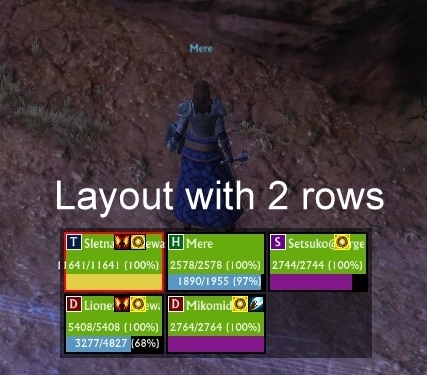
Add absorb support. As targets build up absorbs/shields they will gain a light blue border. Can be disabled in the config for panel settings by unticking:
Absorbs are shown as a border around the panels:
Version 0.4.10
When loading the config ui tell the watchdog to be quiet.
Version 0.4.9
I've actually loaded up the ui and game to take a look at if it seems to work on the latest 1.11. It does appear to.
Note that this version also includes some async loading items I was working on to reduce the time spent loading frames etc. Most of this is to avoid the watchdog complaining.
Version 0.4.8
Various tweaks for 1.9 around future compatibility.
Main "fix" is for performance at logon, hopefully, this will remove the warnings fed back via the daily error report for CheckForStrays burning too much CPU.
Also adds support for unit radius changes, so that range will allow for any changes in radius (not sure players ever can, but it at least covers that possibility)
Version 0.4.7 (the "I'm not dead yet" release)
Update supporting libraries for 1.9
Update needed env to 1.9
More changes to come once I've caught up on where things are with rift.
Version 0.4.6
Add options to configure fill of panels (under Filtering and misc)
Also update a few libraries
Version 0.4.5
Add ability to enter multiple spells into a cast button. The code accepts a list of comma seperated abilities, if splits the list into a /cast line for each spell.
If something stops working, please use /mhf tooltips and examine the generated macros.
Version 0.4.4
Bug fix: Healer's Covenant causes buff tracking issues. Any buff that can also be a debuff would cause issues if tracked in seperate trackers. I didn't see this in my testing, as I was using "Latent Blaze", but on the same tracker.
Version 0.4.3
Bug fix: when players are moved in the raid UI, we lost track of them
Bug fix: icon settings weren't being saved and loaded, so icon->buff slot mappings were lost
Bug fix: suppressmacrofailures should be used to create the macros, to avoid some casting spam.
Version 0.4.2
Bug fix an issue with buff lists that causes them to be nil, and so produce errors:
Error: MereHealingFrames/BuffManager.lua:309: attempt to index field 'BuffNameToDetails' (a nil value)
In MereHealingFrames / MereHealingFrames.Events.BuffAdd, event Event.Buff.Add
stack traceback:
MereHealingFrames/BuffManager.lua:309: in function 'BuffAdd'
MereHealingFrames/BuffManager.lua:122: in function 'BuffAdd'
MereHealingFrames/Events.lua:55: in function <MereHealingFrames/Events.lua:51>
Version 0.4.1
Add UI to configure the icons.
Currently allow 3 rows of icons, and all any mapping of icons to buff slots.
Updated LibSimpleWidgets to 1.9.4
Version 0.4.0
Fix some issues with 1.8 and sample units.
Fix range check inverted check.
Update panel status update code to handle all the different player statuses. This should make panel borders, blocked and out of range units clearer and function as expected.
Version 0.3.7
Add sample units tab to /mhf config. This adds sample units to the frames to pad them out. Units are chosen randomly from the callings, roles are based on those selected from the bars or a pre-made button. This should allow for configuration of the different filtering and other settings without needing a real raid or party.
Version 0.3.6
A few new features:
* Cleansable counter buff tracker, add a new tracker, change type to cleansable counter, and then pick a buff slot.
* Ready check monitoring (role icons becomes a tick or cross)
* Optional shadowed text for health, mana, energy and name
* More sort options for layouts:
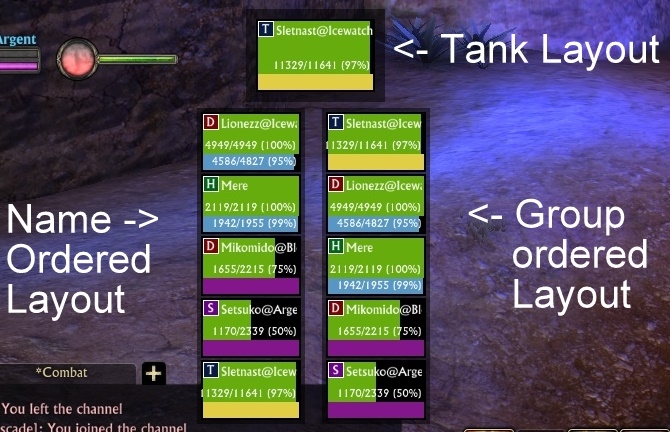
* compact group id sorting (looks like the default rift ui)
* role then name ordering
A number of bug fixes have also been made, the one that stands out is:
* de/buff tracking sometimes had the wrong times
* group filtering was broken, it's now fixed (everything was treated as group 1)
* the rest of the bug fixes were in new features
Version 0.3.5
Add command line to lock and unlock moving or layouts:
/mhf layout --lock
/mhf layout --unlock
Add command lines to add fake raid members:
Add a five man team (1 tank, 1 heal, 1 support):/mhf debug -f
Add a ten man team (2 tanks, 2 heals, 1 support):
or
/mhf debug --fiveman
/mhf debug -t
Add a 20 man team (3 tanks, 6 healers, 2 support)
or
/mhf debug --tenman/mhf debug -w
Remove fakes:
or
/mhf debug --twentyman/mhf debug -n
Version 0.3.4
or
/mhf debug --nofakes
or
enter combat :)
Refactor some code to be shared between buffs and debuffs. Fixes a bug with debuff handling not working correctly.
Fix a UI bug, if a reloaded list no longer contains the previously selected list, pick the first entry. Fixes an issue when changing buffsets, trackers weren't selected, so you could enter data into a previous tracker.
Still a bug to fix there if the list is empty, need to actually clear out the tracker data, and disable the tracker entry.
Version 0.3.3
Some bug fixes to buff handling.
Optimize the buff handling some more, particularly around the handling of timer updates, I've tried to streamline the code.
Also PTS feature, range checking has been implemented, and should work once 1.8 is released. (maybe some work to optimize the tracking)
Version 0.3.2
Add support for configuring the buffs.
Currently one buff type is support, priority lists. The first found buff in the list is displayed.
I may expand the support so that it can display over multiple slots. IE you can see the first, 2nd and 3rd buff active in the list.
Other types will be created, but I wanted to put buff configuration in.
Version 0.3.1
Fix some issues with relogging in and finding you've frames from when you logged off. In theory I've hooked a location that I think should be after we enter combat in a combat DC, so we'll keep the data, or if out of combat is safe to throw the data, and rebuild from incoming events.
Complete buff engine rework. The code for the core buff routing is complete. There's some UI present, but it doesn't save or configure anything. This breaks the buff handling code from the UI layer. However, it should have no impact on anyone.
Next I need to add config UI, and code up the buff tracking code, currently there's a priority list one coded (nothing that can be configured), IE it displays the icon of any of the listed buff/debuffs, with the icon displayed being that of the first on the list that's active.
Version 0.3.0
Added support for filtering each layout, you can filter based on:
* calling (warrior, rogue, mage, cleric)
* role (dps, tank, support, healer)
* grouping (group 1-4)
Layouts now have labels (which you can turn off, or adjust the height of)
In combat reconnects and reloads should put up frames. Not that it may not be 100% bug free right now, and needs more testing.
Version number is now shown in the config dialog, and also at startup.
Options for text formats are now available for each bar, you can round the health/mana numbers, and also change the amount of detail shown by the numbers.
You can hide mana and energy/power bars if you don't want them, or reduce the size of them.
Version 0.2.7
Rework some of the internals, this should help redisplaying of frames when relogging after a dc, as I believe I should get some basic frames up before the player is put into combat, and then the rest of the details will appear as the server sends the details over.
Also fix some group membership change issues.
Version 0.2.6 (not released due to internet outage at home last night)
Add support for renaming layouts
Version 0.2.5
Link up the command line spell interface so that it refreshes the config UI.
Make some of the command lines show success/failure messages
Support mouseover macros.
Version 0.2.4
Add support to add, rename and delete spell sets.
Add ability to pick role/soul specs for each spell set.
A spec/role can only be assigned to one spell set, but a spell set can be active for multiple specs.
Version 0.2.3
Default to layout borders allowing layouts to be moved (locks on combat)
Allow the creation of new layouts
Allow the deletion of layouts
(Note you can't rename the layouts yet)
Version 0.2.2
First implementation of spellset configuration. Rather basic right now, but should be a little easier than the macro method.
Version 0.2.1
New version to include Safe's Raid Manager 1.1.3. This includes the fix for the group issues I was seeing, without me having a private version.
Version 0.2
Fix some issues with group membership when people leave the group (note that I've a patched SafesRaidManager in this build, however, it shouldn't cause any issues with KBM)
Add initial config UI accessible with:
/mhf config
It allows configuration of the default layout, sizing changes should take instant effect, filter changes may not take effect and need a reloadui. Changing sort order should be instant.
Spells tab is work in progress, I expect to complete the spells tab in the next couple of days.
Version 0.1.3
Fix group membership issues, by handling SRM.GroupChange event
Fix Warrior power bar not changing (I thought it was energy, it's not it's power, oddly there's no powerMax like other resources)
Update default buff/debuffs so that Latent Blaze also shows the debuff
Version 0.1.2
Add ability to reset spell list
Fix nil de-ref when showing tooltips and nothing is configured for a button.
Version 0.1.1
Add basic support for configuring spells and coloursArchived Files (55)File NameVersionSizeAuthorDate0.4.37169kBMere10-13-13 11:57 AM0.4.36169kBMere10-12-13 10:42 AM0.4.35169kBMere08-26-13 05:06 AM0.4.34169kBMere08-03-13 08:26 AM0.4.33168kBMere07-30-13 03:29 PM0.4.32169kBMere07-27-13 07:44 AM0.4.31162kBMere06-30-13 05:22 AM0.4.30161kBMere06-27-13 07:09 PM0.4.29161kBMere06-26-13 01:08 PM0.4.28160kBMere06-26-13 10:51 AM0.4.27155kBMere06-24-13 01:15 PM0.4.26155kBMere06-22-13 07:37 AM0.4.25158kBMere05-06-13 08:13 AM0.4.23158kBMere03-25-13 06:03 PM0.4.22157kBMere03-20-13 07:18 AM0.4.21157kBMere03-13-13 06:25 PM0.4.20157kBMere03-11-13 06:01 PM0.4.19157kBMere03-02-13 06:01 AM0.4.18156kBMere02-10-13 07:31 AM0.4.17156kBMere01-30-13 04:02 AM0.4.16156kBMere01-26-13 06:19 AM0.4.15136kBMere12-02-12 10:53 AM0.4.14136kBMere11-11-12 01:41 PM0.4.13136kBMere11-11-12 09:23 AM0.4.12136kBMere11-10-12 03:00 PM0.4.11132kBMere11-10-12 08:15 AM0.4.10132kBMere11-09-12 05:50 PM0.4.9131kBMere10-26-12 08:25 AM0.4.8124kBMere07-01-12 01:17 PM0.4.7124kBMere07-01-12 04:41 AM0.4.6122kBMere05-09-12 01:49 PM0.4.5110kBMere04-26-12 01:48 AM0.4.4110kBMere04-25-12 04:05 PM0.4.3110kBMere04-25-12 12:26 PM0.4.2109kBMere04-25-12 02:23 AM0.4.1109kBMere04-21-12 12:46 PM0.4.0107kBMere04-20-12 05:57 PM0.3.7107kBMere04-16-12 04:14 PM0.3.6105kBMere04-15-12 01:59 PM0.3.598kBMere04-12-12 04:58 PM0.3.497kBMere04-10-12 12:55 PM0.3.397kBMere04-09-12 10:24 AM0.3.296kBMere04-08-12 02:59 PM0.3.191kBMere04-07-12 01:27 PM0.3.079kBMere04-06-12 01:25 PM0.2.775kBMere04-05-12 06:12 PM0.2.574kBMere04-04-12 02:14 PM0.2.474kBMere04-03-12 04:25 PM0.2.371kBMere04-02-12 05:02 PM0.2.270kBMere04-02-12 03:12 PM0.2.169kBMere04-01-12 04:30 PM0.269kBMere04-01-12 04:21 PM0.1.330kBMere03-25-12 07:35 AM0.1.229kBMere03-23-12 08:42 PM0.127kBMere03-23-12 05:43 AM

Comment Options  01-30-14, 04:13 PM
Forum posts: 0File comments: 1Uploads: 0Shift + Left click not working
Hello,
First of all, thank you for this nice addon.
I have a "bug" when i try to use a spell on "Shift + Left Click".
It does not cast the target spell (Embrasement latent / Latent braze), it cast the spell on "None + Left click" instead.
ANd it displays this on the chat (french ui) :
"Impossible d'utiliser la capacité inconnue : [shift] @u054D000035D23BCE Embrasement latent."
Something i am doing wrong ?
Thanks by advance.Last edited by Mahoneko : 01-30-14 at 04:16 PM.

 01-01-14, 11:37 AM
Zombie
01-01-14, 11:37 AM
Zombie
Forum posts: 4File comments: 84Uploads: 0Target highlighting isn't something that's currently supported.
Probably not that tricky to add (need to hook up some event stuff)
I'll add it to the list for a future version. (assuming I find time to actually do an update at some point soon)
11-19-13, 07:46 AM
Forum posts: 0File comments: 1Uploads: 0Highlight Target
Hi
Great addon however currently i cant seem to work out a way to highlight on the Grid which person i currently have targeted. am i missing something or is this not currently an option? (basically looking for an option to highlight the currenly selected grid member with a border or something.)
i dont use mouse overhealing, i click a person press a heal then while that heal is being cast select (click) the next person and pick the heal im going to give them. there has been a couple of times were i though i was healing one target but have ended up spam healing another and then had to sheepishly explain to the tank why hes picking up this teeth.
cheers for the addon
10-13-13, 06:32 PM
Forum posts: 0File comments: 8Uploads: 0Re: Performance warning issue
np! I installed it, but it appears I napped through the rest of the event, so i'll pop into some pvp later and test it. Thanks for looking at stuff so quickly, and moreover, thank you for a great add on!
10-13-13, 11:56 AM
Zombie
Forum posts: 4File comments: 84Uploads: 0Performance warning issue
Appears I didn't quite do enough testing. In combat I can't call the Quiet function, but then in combat the code also doesn't need to update the frames (as they can't be changed while in combat)Quote:Originally Posted by astrophel1Was fine for about ten minutes, then I got this error.Quote:Originally Posted by astrophel1Yeah, they were.
Intel duo core 2.66 ghz
And Sure, I'll install it now and let you know. Thanks!
Error: Function requirements not satisfied
In MereHealingFrames / MHF.UnitChangeDone
stack traceback:
[C]: in function 'Quiet'
MereHealingFrames/RaidManagement_LibUnitChange.lua:100: in function <MereHealingFrames/RaidManagement_LibUnitChange.lua:94>
I've adjusted the code to not do either while in combat, that should fix the problem.
Can you try the new version 0.4.37?
10-13-13, 10:09 AM
Forum posts: 0File comments: 8Uploads: 0Re: Re: Re: Re: Re: Re: Re: Re: Not remembering spells
Was fine for about ten minutes, then I got this error.Quote:Originally Posted by astrophel1Yeah, they were.
Intel duo core 2.66 ghz
And Sure, I'll install it now and let you know. Thanks!
Error: Function requirements not satisfied
In MereHealingFrames / MHF.UnitChangeDone
stack traceback:
[C]: in function 'Quiet'
MereHealingFrames/RaidManagement_LibUnitChange.lua:100: in function <MereHealingFrames/RaidManagement_LibUnitChange.lua:94>
10-13-13, 09:32 AM
Forum posts: 0File comments: 8Uploads: 0Re: Re: Re: Re: Re: Re: Re: Not remembering spells
Yeah, they were.
Intel duo core 2.66 ghz
And Sure, I'll install it now and let you know. Thanks!
10-12-13, 10:43 AM
Zombie
Forum posts: 4File comments: 84Uploads: 0Re: Re: Re: Re: Re: Re: Not remembering spells
Ah, a performance warning. That can be caused by a number of things. I suspect in this case the raid you joined was close to full?Quote:Originally Posted by astrophel1Error: performance warning
In MereHealingFrames / MHF.UnitChangeDone
stack traceback:
MereHealingFrames/HealingPanelLayout.lua:530: in function 'RelayLayoutPanels'
MereHealingFrames/HealingPanelLayout.lua:333: in function 'RelayPanels'
MereHealingFrames/HealingPanelLayout.lua:541: in function 'SetVisible'
MereHealingFrames/HealingPanelLayout.lua:563: in function 'ProcessPendingLayoutChanges'
MereHealingFrames/RaidManagement_LibUnitChange.lua:156: in function <MereHealingFrames/RaidManagement_LibUnitChange.lua:94>
I suspect I might be able to improve it so that when a large batch of updates occurs, eg joining a raid it puts the watchdog to sleep.
The unit tracking code (which is what this is) is fairly complex as it has to track if a unit has changed positions and other things, so
Out of curiosity what kind of cpu do you have? Rift hammers the cpu plenty, so perhaps it's also busy with something else...
Anyway I've asked the watchdog (the thing that triggers performance warnings) to go to sleep when processing raid changes.
Can you try v0.4.36? (is on curse already, and should be on here once approved)
10-12-13, 10:25 AM
Forum posts: 0File comments: 8Uploads: 0Re: Re: Re: Re: Re: Not remembering spells
Error: performance warning
In MereHealingFrames / MHF.UnitChangeDone
stack traceback:
MereHealingFrames/HealingPanelLayout.lua:530: in function 'RelayLayoutPanels'
MereHealingFrames/HealingPanelLayout.lua:333: in function 'RelayPanels'
MereHealingFrames/HealingPanelLayout.lua:541: in function 'SetVisible'
MereHealingFrames/HealingPanelLayout.lua:563: in function 'ProcessPendingLayoutChanges'
MereHealingFrames/RaidManagement_LibUnitChange.lua:156: in function <MereHealingFrames/RaidManagement_LibUnitChange.lua:94>
this is the error message I received. And I have deleted my saved variables and started over, and am still receiving it.
10-12-13, 10:07 AM
Zombie
Forum posts: 4File comments: 84Uploads: 0Re: Re: Re: Re: Not remembering spells
I didn't even know that there was a memory limit on the rift addons. It's possible that MHF could be leaking some memory, but I've never noticed it do so.Quote:Originally Posted by astrophel1I recently started participating in the Mayhem world event, and it is the first time I have entered a raid using mere. I am getting a dialog box stating that MHF is using too much memory and asks me if I would like to disable it, along with an error message. I copied one the other night, but forgot to post it here. As soon as I get another one, I will.
I tried to design things to not need vast amounts of memory or have lots of duplication of data...
10-12-13, 08:56 AM
Forum posts: 0File comments: 8Uploads: 0Re: Re: Re: Not remembering spells
I recently started participating in the Mayhem world event, and it is the first time I have entered a raid using mere. I am getting a dialog box stating that MHF is using too much memory and asks me if I would like to disable it, along with an error message. I copied one the other night, but forgot to post it here. As soon as I get another one, I will.
10-01-13, 10:25 PM
Forum posts: 0File comments: 8Uploads: 0Re: Re: Not remembering spells
So far I only have one spell set, but I also just experienced the same issue with the buff slots. I created a new buff tracker, and all of my other trackers forgot their buff slots and the new buff tracker I added was no longer there(I did make sure I had hit the apply changes button). I went through, and reset everything, logged out and logged back in, and my changes seem to remain this time. However I will send you send you my saved variables so you can take a look at it.Quote:Originally Posted by MereI've not heard of this issue. It might be worth clearing the saved variables file for merehealingframes. (or mail me the broken one and I can see if I can work out why it doesn't save and load)Quote:Originally Posted by astrophel1I have noticed that I will set a spell to a specific button, however when I log back in, that spell is no longer bound to that specific button. I don't notice a specific set of factors when this happens. Only that it seems to be the most recent change I have made.
Is it with all spellsets?
09-28-13, 10:36 AM
Zombie
Forum posts: 4File comments: 84Uploads: 0Re: Not remembering spells
I've not heard of this issue. It might be worth clearing the saved variables file for merehealingframes. (or mail me the broken one and I can see if I can work out why it doesn't save and load)Quote:Originally Posted by astrophel1I have noticed that I will set a spell to a specific button, however when I log back in, that spell is no longer bound to that specific button. I don't notice a specific set of factors when this happens. Only that it seems to be the most recent change I have made.
Is it with all spellsets?
09-18-13, 02:09 PM
Forum posts: 0File comments: 8Uploads: 0Not remembering spells
I have noticed that I will set a spell to a specific button, however when I log back in, that spell is no longer bound to that specific button. I don't notice a specific set of factors when this happens. Only that it seems to be the most recent change I have made.
08-31-13, 05:01 PM
Zombie
Forum posts: 4File comments: 84Uploads: 0Re: Questions questions questions
Oddly someone else requested this recently. I've not actually looked at what it'd take to add pets in (it wouldn't take too much to detect pets, it's mapping them into frames etc where the fun comes in). I probably should look into it, so I know what properties they can have.Quote:Originally Posted by FublesHey there - first off I've used every healing frame out there and I love MHF, it's so responsive and detailed with buffs. I was wondering if you were going to add a toggle option for a pet group? For those "the tank threw a hissy fit but we might stand a chance with a pet" moments.
One thing that does worry me about pets is that they seem quite dynamic, eg pets summoned during combat wouldn't show up.
Let me have think on this, and send you a PM.Quote:Originally Posted by FublesAlso - I'm not by any means experienced in game dev or add-on dev but I am a professional interface software developer and have about 4-8 hours a week I could throw at MHF. I've worked with .lua files and the bizarre C they descended from before so if you could use a hand let me know!
- Categories










Riftui
AddOn Sites

© 2022 MMOUI