Download
(276 Kb)
Download
Updated: 05-22-13 11:34 PM
Pictures
File Info
Updated:05-22-13 11:34 PM
Created:03-30-12 03:18 PM
Downloads:3,933
Favorites:31
MD5:
Click Box Healer  Updated less than 3 days ago!
Version: 1.5.4
by: Solsis00, niemassacre
NOTE: Change of pace. We are back in action. Slowly, but back. See comments area for updates.

1.5.4 - No end user updates were made. Just basic error checking and ownership updates on the back-end. Hang in there with me as we get this thing going again.

**PLEASE READ**
To simplify the update process, update notes will no longer be updated here. Going forward, please view either the changelog or the comment area for addon changes/updates


PLEASE LEAVE FEEDBACK! Your feedback helps develop this addon with features desired by everyone, rather than just myself. If you have any likes, dis-likes, suggestions, or just general thanks, please feel free to leave them in the comments or send me a pm. Thanks again for the continued support!

Now available as I mentioned, I am now taking donations. See comment area for more details. If you enjoy this addon please help support future updates:

Support CBH Development


###########################################################

OVERVIEW:

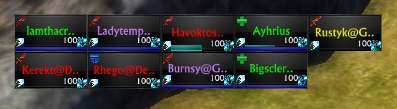
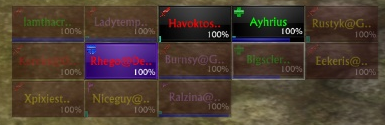
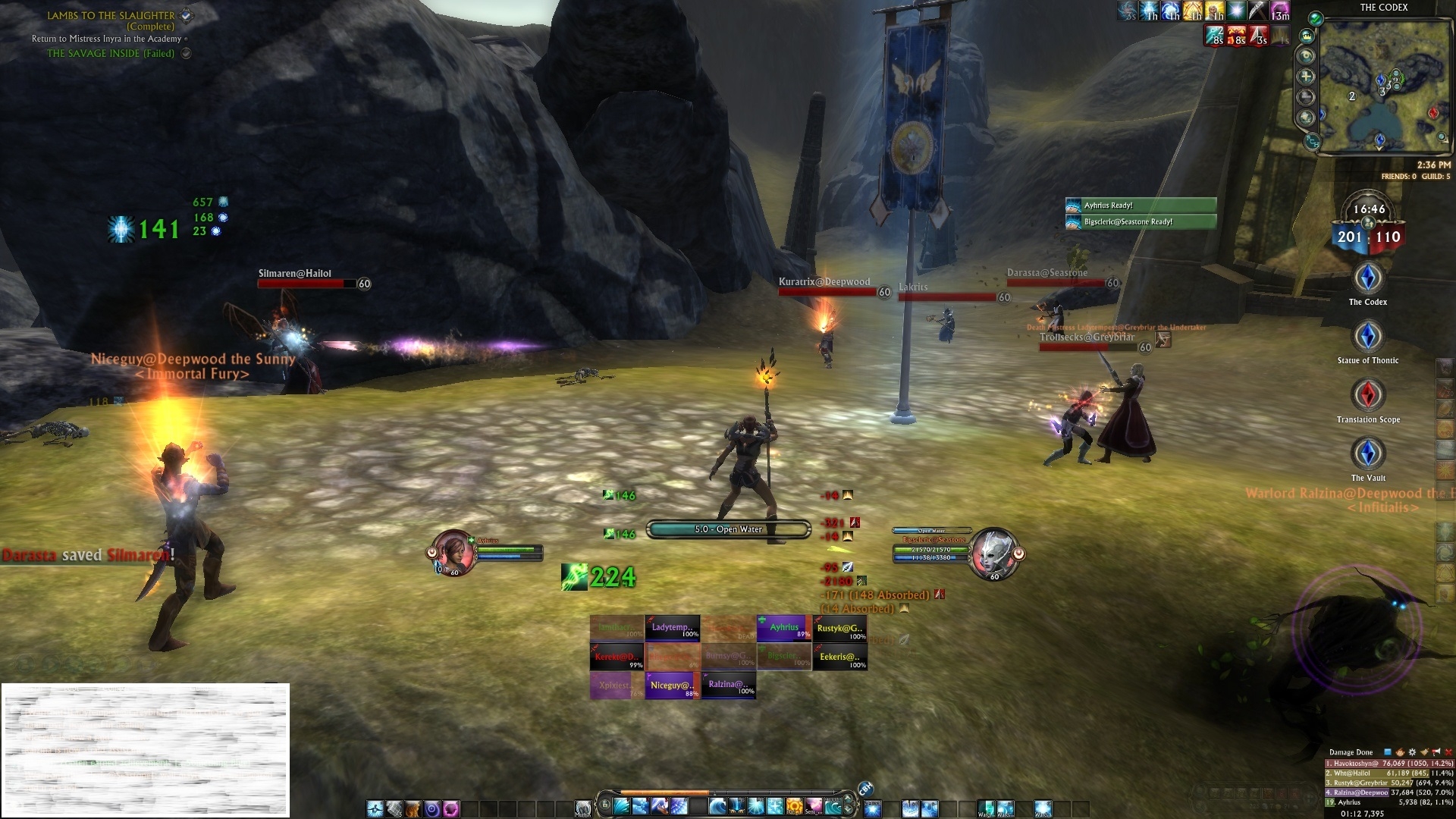
Click Box Healer is primarily viewed as a healing addon, but can be useful to all roles. CBH is used to quicken healing and more efficiently identify the current status of your party, displaying everything from health to buffs and debuffs on each member. This addon allows macros to be bound to click actions that are performed on a set of raid frames that will cast the selected abilities/macro. These frames are usable when solo, in a party, with pets (groups 5 or less), or in a raid. It accepts up to the basic 5 mouse buttons, along with scroll up and down, as input (as limited by the RiftAPI). These inputs can be bound in conjunction with keyboard buttons (shift, ctrl, alt) for even more possibilities.

The addon can be moved and resized to fit any screen comfortably. This addon has the ability to track up to 3 customizable buffs (one for each available corner), as well as debuffs on each frame for poisons (green), diseases (orange), curses (purple), and whitelisted debuffs (red). Debuffs are displayed as a colored box around the health percentage accordingly colored to the debuff.


###########################################################

CONFIGURATION:
  • There is a minimap button included that will do the following: LeftClick - Opens options window and unlocks raid frame, MiddleClick to toggle hiding/showing the raid frames, RightClick and drag to move minimap icon

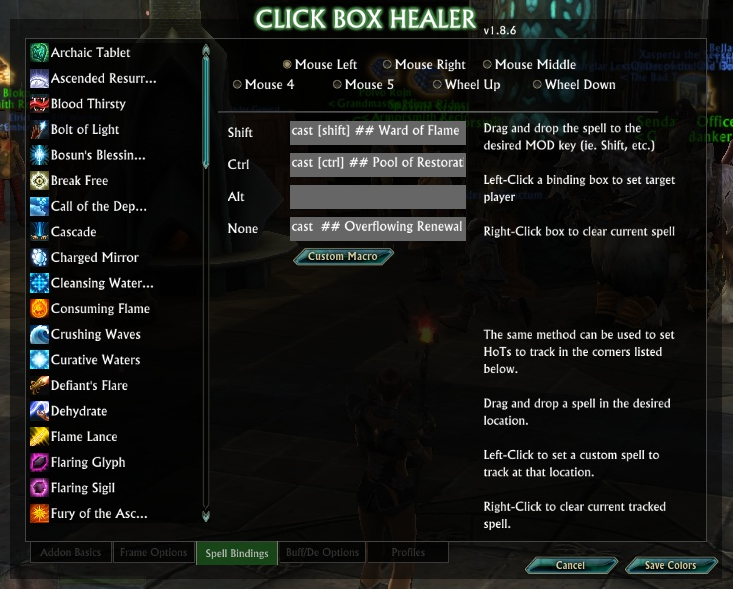
The configuration of the addon is fairly simple. It has an in-game option menu that allows you to set the macro binds to each mouse button with an optional keyboard key for more combination possibilities. In these fields you can pretty well write anything that you can put in a macro. The bindings are saved by the current spec/role you are in. ie. 1-6 and will change automatically if/when you change roles.

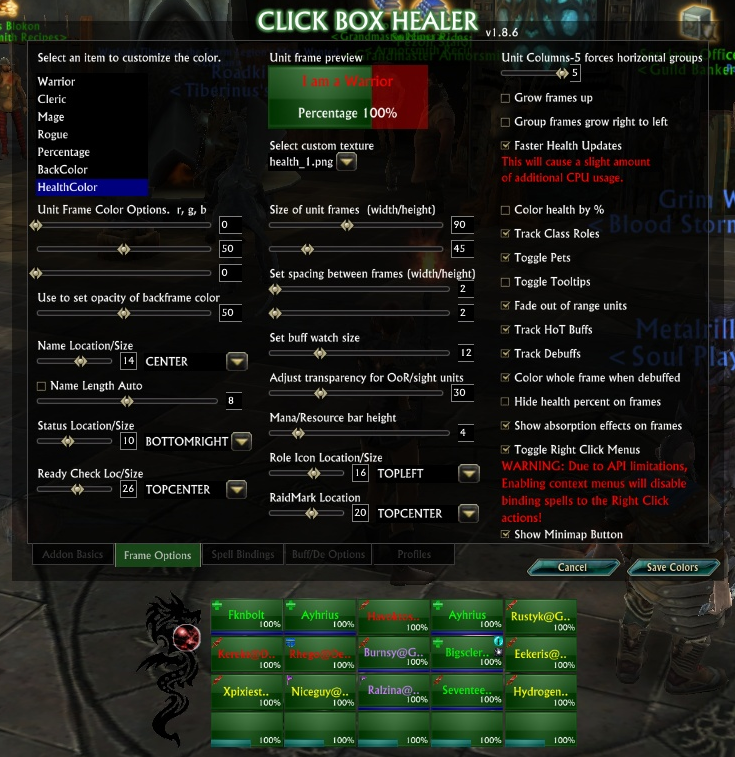
In the 2nd options tab you will find the ability to change the health bar settings. Multiple pre-defined textures as well as many color options settings for various pieces of the unit frames including the backdrop, healthframe, text colors, etc.

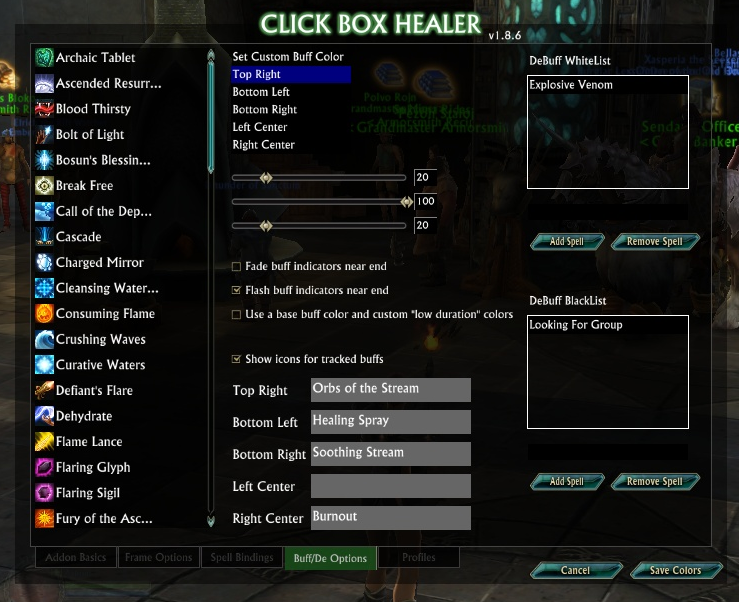
The last tab is where you can setup all your buff and debuff options. You can setup de/buffs to track. Tracking a buff will cause it to show up in a resizeable square on the affected raid frame. You can whitelist debuffs that don’t normally show up for added flexibility as well as blacklist ones you would like to hide.


Command line options available: (type /cbh in game to see list)
/cbh show - Show window
/cbh hide - Hide window
/cbh reset - Reset default addon settings

/cbh config - Display config window
/cbh toggle - Toggles displaying main window
/cbh lock - Allows you to move the frame. Type again to lock.
/cbh tt - Toggles tooltips on frame mouseover


###########################################################

KNOWN ISSUES:
  • The frame for the Defiler pet "Beacon of Despair" will bug out if it despawns because you run far away from it. I'm trying to create a fix for this, but it's rooted in an issue with how Trion handles the pet. If the pet frame becomes unresponsive, you may need to relog to clear it.

Due to limitation of the API in RIFT at this time, while you are in combat, no changes can be made to the addon. You cannot get in the options window, unlock the frame, toggle the tooltips, or close the frame.

###########################################################

THANKS AND APPRECIATIONS:

An extra thanks to the recent addition of Niemassacre to the dev team.
A huge thanks to dOxxx's LibSimpleWidgets library. Made several pieces of this addon much more functional and usable.
Thanks also go to ZorbaTHut for LibUnitChange.
And a big thanks to Protonova for the tips they provided that helped initially fix the performance bugs.
Nice work to the original authors on WoWAce for some of the health frame artwork used in this addon.

All feedback and ideas are welcome. Please let me know if you have any feedback at all. It is appreciated and contributes to the continuation this project.
Change Log:

5/23 - v1.5.4 Reborn
  • As stated in the addon details, nothing major here. Just some infrastructure changes.
  • Updated file location for option window.
  • Updated author ownership information.


12/18 - v1.5.3
  • Added option to show icons on buffs.
  • Absorption bar is now larger for Warriors and Rogues.
  • Custom buffs now match if the beginning of the spell matches what you've entered. "Link of" will catch all your Defiler links!
  • Other small bug fixes.


12/5 - v1.5.2
  • Fixed issue with absorption bar not correctly responding to Burnout debuff.


12/4 - v1.5.1
  • Fixed issue with "duration" and "begin" errors on buffs and debuffs that did not contain those values.


11/28 - v1.5
  • Rewrote buff monitoring section for improved CPU performance.
  • Fixed performance issue when in a raid of 5 or fewer people.
  • Added absorption tracking to frames. This tracker also shows if Burnout is present on the target (pink coloring, vs normal cyan coloring).
  • Hopefully fixed last issue of floating point math errors.
  • Frames now correctly display the new graphical raid markers
  • Ability and Buff lists are now created when Options pane is loaded, to reduce performance error warnings.


11/5 - v1.4
  • Added scroll wheel casting options.
  • Fixed more parameter bug issues.


9/16 - v1.3
  • Updated code to be compatible with the new API changes.


7/18 - v1.2
  • Fixed bug that caused a nil error on line 162 upon initially loading.
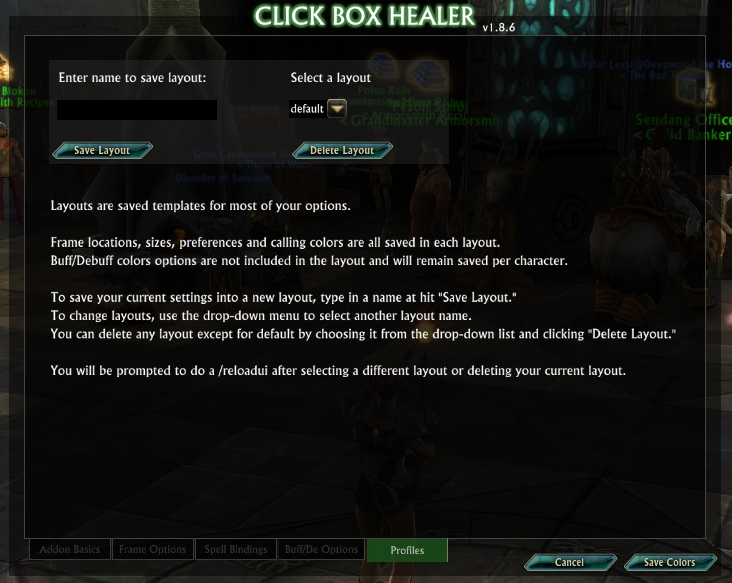
  • Added the ability to save profiles across characters. This includes Frame spacing, sizes, textures, location on the screen and health colors. THIS DOES NOT INCLUDE ANY BUFF COLORING OPTIONS.
  • Added a message that gets displayed if you try to open the config window while in combat.
  • Added some more performance checks to help reduce the occurrence of watchdog (addon performance monitor)


7/11 - v1.1
  • Characters who are dead now show “Dead” for health, rather then “0%”
  • Fixed a bug with certain slider values creating floating point errors.
  • Minimap button no longer responds in combat, to fix “secured frame” error.
  • Added health warning color option - colors the frame yellow/red at low health levels.
  • Adjusted several textures slightly to represent the colors better.
  • Added dynamic length for unit names - changes as you change your frame width!
  • Updated the addon help file that is packaged with the addon.
  • New screenshots uploaded of the addon.
  • Fixed a bug that caused it to show selected unit boxes for units that aren’t available.
  • Fixed a bug that prevented new unit frames being drawn after leaving combat.
  • Fixed a bug with the offline text still showing on units when hide percent is active.
  • Fixed a bug with Buff list selection not clearing when selections change.
  • Added an option to set custom buffs to watch. This can include debuffs such as ones from Cleric’s shield abilities.
  • Fixed a bug where buffs that were removed from the watch list were still showing on frames.
  • Fixed a bug that caused units to show out of range/los incorrectly. (hopefully permanently fixed this time)
  • Fixed a bug that was causing unit frames to target pets or not be targetable at all due to incorrect party status/counts.


7/3 - v1.0.9
  • Fixed bug with Role Icon size not loading the saved value.
  • Fixed positioning for buffs to be proportional to the frame size.
  • Fixed bug with check box option for frame right to left being checked when it wasn't true.
  • Fixed issue with buff colors not updating after role change.
  • Added more filters to spell ability list populating to weed out unnecessary listings.
  • Fixed issue with obscured text with certain checked boxes in options window.
  • Fixed issue with text listing of saved buff locations not resetting on role change.


7/2 - v1.0.8
  • Added option for buffs to flash as they expire. Choices now are flash or fade.
  • Adjusted the colors for the debuffs. Curses are a little more purple, poisons are a little more teal-green, and diseases are a yellow-orange.
  • Fixed a bug that caused errors when disabling the role icon monitor.
  • Fixed a bug with out of range and los not detecting members when they are zoned in different areas and newly joined to party.
  • Fixed an los bug that caused the player to show faded when a group is disbanded.
  • Added separate background for manabars.
  • Added options to have buff expiration warning colors as well the option to customize the colors.
  • Fixed a bug that was causing whitelisted debuffs to not show up when using the full frame debuff option.


6/27 - v1.0.7
  • Added ability to change the buff color.
  • Added 2 additional buff slots. Left Center and Left Right.
  • Fixed an issue where the ability list was not auto-refreshing.
  • Modified Ready Check icon.
  • Added buff fading as the duration falls off.
  • Added an option to change the alpha for out of range and los frames.
  • Added an option to color the whole frame when debuffs are present.
  • Fixed a bug with frames not showing warfront status'.


6/20 - v1.0.6
  • Fixed an issue with warfront status' not being displayed on group members.
  • Fixed offline status not showing up correctly on login or /reloadui
  • Fixed mana bar detection and updates to only happen on mana changes.
  • Fixed a bug found in the player pet selection highlight causing it to not show as selected.
  • Fixed a bug found in the pets that was causing the wrong group status.


6/19 - v1.0.5d
  • Re-coded group determination check allowing slightly better performance.
  • Added configuration to allow growing frames from right to left.
  • Fixed the reverse growth to no longer require a /reloadui. All settings can now be changed on the fly.
  • Added the ability to hide the role icon. When role isn't tracked it will hide it.
  • Fixed ghost frame (yet again, hopefully for good this time)
  • Fixed a bug that caused pets to be highlighted even when not displayed.
  • Fixed a bug that caused incorrect role values and out of sync saved keybind information.
  • Made some adjustments to the range check to allow slightly better performance.


6/5 - v1.0.4
  • Attempted again to fix the bug that is causing frames to still show as selected after group members disband. Should be fixed this time. Will continue to monitor.
  • Fixed a but with the mouseoverunit that sometimes caused an error while in combat.

### Going forward: Updates will be spread out a little farther going forward to provide more time for testing and error checking. I will continue to update my comments area as I have in the past to inform my followers of progress. Thanks everyone for the continued support.
6/2 - v1.0.3
  • Fixed a bug where under some specific circumstances, keybinds would be incorrect for the original spec you started the addon with. This was due to its base default value being 1. This has been changed to read the correct spec that you load the addon with at initial login.
  • Fixed the right click menu not pulling up for the correct target.
  • Corrected a bug that caused the Buff watch selections to DISPLAY incorrectly after changing roles.
  • Added some more performance tweaks to help reduce CPU. **This will be ongoing to insure CBH does not break with 1.9**


5/31 - 1.0.2
  • Corrected a bug found that was not clearing hots properly when you are solo.
  • Corrected an issue when units are 100% the frame was slightly off appearing as though they were damaged.
  • Added Explosive Venom to the debuff list as a default debuff to monitor.


5/29 - 1.0.1a
  • Corrected an issue found with some units still not showing correctly after group members were moved changed.
  • Tested more performance changes. Looking at about 3.5-4% CPU in a full raid group. Those changes are included.


5/29 - 0.9.9a
  • Corrected an issue found with some units still not showing correctly after group members were moved changed.
  • Some performance testing was done. Will make some changes for the next update.


v0.9.8d just updated some properties so my addon will now generate it's files in a ClickBoxHealer Sub-directory inside the zip. Otherwise nothing has changed. Await the next update.


5/21 - 0.9.8c
  • Added 2 titles to identify the debuff selections as whitelist or blacklist
  • Added Raid Markers. ** Placement a little difficult and might move.
  • Fixed the issue with buffs/status' not following units when moved in group or when UI is reloaded.


05/19 - 0.9.8a
  • Added a debuff whitelist for the ability to add specific debuffs to monitor.
  • Added a debuff blacklist to ignore specified debuffs and not show them.
  • Completely re-coded the coloring options on tab 2 for the frames. Fixed some bugs with colors not changing in the preview and colors not applying correctlly under different scenarios.
  • Made the default frame color black on a reset or new setup.


05/14 - 0.9.7a
  • Spell lists should now load automatically at initial login.
  • NEW BUFF SYSTEM LIVE! Buffs can now be assigned to specific corners.
  • Buffs now show stack count for relevant buffs.
  • Added an option to change the Role Icon size.
  • Moved unit frame buff square resize to the frame options tab.
  • Several textures were darkened and should take better to being colored now.
  • Reduced CPU overhead by 4%+ with the new buff setup.


05/13 - 0.9.6g
  • Fixed an issue with calling colors not applying properly when changed.
  • Corrected the buff watcher sizing to reflect the new multi buff system.
  • Converted the buff watcher size config to a slidebar for easier input.
  • Change the locked frame graphic.


05/11 - 0.9.6f
  • Fixed the unit frame spacing so it gaps horizontal/vertical accordingly.
  • Added vertical gapping.
  • Removed the drag window.
  • *** Changed to a drag button/orb in the left corner.
  • Added resizing of the unit frames to the config window.
  • Converted the texture list to a dropdown to utilitze space.
  • Did some more code cleanup and itemization.


05/08 - 0.9.6d
  • Fixed the options window so when closed it will always lock the unit frames.
  • Fixed an issue with roles not loading at initial login.
  • Fixed the issue with frames not updating on add/remove/re-arranging party/raid members.
  • Shrunk the ready check size about 30%.
  • Added an option to change the font sizes on the unit frame.
  • Added current target highlighting.
  • Added mouseover targeting. You can now use mouseover macros with these raid frames.
  • Added multiple HOTs tracking (not configurable currently). Tracks Soothing Stream, Healing Spray, and Healing Current as well as the stack count for Soothing Stream.
  • Structure for the new debuff list is in place. Working on the configuration and retrieval of stored debuffs.
  • Added the ability to sort groups bottom to top.
  • Added the ability to sort groups left to right.
  • Fixed an issue with the target highlighting empty frames for pets that aren't being shown.
  • Contexts menus are in. ***Due to API limitations, while enabled you can't use right click spell bindings.
  • Fixed all the old current textures to allow better coloring.
  • Added 15 new textures of different variety to allow more customizing.
  • Current texture selection now applies to the mana bars.
  • Changed health color configuration to only apply when "Apply Colors" button is clicked.
  • Added the ability to change the horizontal gapping for unit frames.


[04/28/2012 - 0.9.5
  • Only thing in this update really was fixing the ready checks. They should now work with no issues. Tested with multiple people in the guild. Thanks for the patience and again I apologize for any inconvenience it may have caused.


04/26/2012 - 0.9.4
  • Added ready checks. Some people are having problems with this. It has been disabled until 9.5
  • Added current version number to welcome message.
  • Added range checks.
  • ***Range checks added some cpu to the addon. Looking into ways of reducing this back to normal.
  • ***Until the CPU issue is resolved I have added an option to disable the range checking in case it causes difficulties.
  • Continuing to find/add ways to reduce the CPU load from the addon.
  • Fixed a coding problem that caused the LoS to not work on initially loading.
  • Added Warfront status checks. Will now show unit as being in a warfront.
  • Changed minimap settings. Now LeftClick opens config window and unlocks frame, MiddleClick now toggles hide/show frame, RightClick moves the minimap button.
  • Added a new tab in the config window for general options.
  • Added an option to enable/disable the minimap button.
  • Added tooltips for unit frames that shows current keybinds. (Brought this back upon a few requests but is disabled by default)


04/23/2012 -- 0.9.3
  • Changed LoS settings to make it more apparent which frames aren't available
  • Added health frame coloring
  • Added some more performance checks to further reduce lag in large groups
  • More changes to the options screen. Tabs are renamed to better locate the desired options.
  • Color settings in the config now has an Apply Colors button to apply the colors.
  • Color preview is complete and can now fully view all changes to the unit frames.


04/20/2012 -- 0.9.2
  • Fixed an issue with empty values that were causing errors in some of new updates No more cbh reset with new updates
  • Added binding being saved by current "spec/role"
  • Added a minimap mouse icon for ease of access to options and to toggle moving the unit frames.


04/18/2012 - 0.9.1
  • MAJOR PERFORMANCE FIX. After two long nights and some reading I managed to fix the performance issues.
  • With the added performance fix, I also increased the refresh speed allowing frames to stay more accurate.
  • ADDED MANA BARS!
  • Frames will now fade out when units are LOS rather than turning grey.
  • Changed Aggro box texture. Subject to change again. Not sure I like it yet.
  • Finished the unit frame border texture. I think it looks better now.
  • Can now change the size of the HoT Buff Icon.
  • Still doing code cleanup and commenting on the backend. Removing old test and debugging code.


04/14/2012 - 0.8.4
  • Due to requests I re-added the borders around the frame.
  • Made some adjustments to the border image. Still looks kind of crappy to me but works for now.
  • Added 4 new textures. Nothing special. Put in place for testing the upcoming color customizing.
  • Added a new texture for the HOT buffs.
  • Made some ongoing changes to the configuration window. Looks a little better now.
  • Increased some of the font sizes for more visibility and readability. More to do here.
  • Made the ability list physically longer to reduce scrolling. Filtered out more un-needed spells.
  • Moved the refresh ability list button to the bottom of the options window.
  • Cleaned up the boxes on each tab.
  • Re-arranged color selections and settings on tab 2. **Might turn into a drop-down selector thanks to SimpleWidgets most recent update.
  • Added the ability to change to backdrop color behind the health frame.
  • Added to the texture preview to allow viewing the background color change as well.
  • Made some minor performance changes. Located an overall design flaw in the performance and will be working to correct it in the upcoming releases.
  • Did lots and lots of code cleanup and optimization. Removed a lot of old un-needed coding. Organized a little better for easier reading. Separated code into more files for easier location. Added many commented areas helping identify the functions of the code.


03/31/2012 - 0.8.2
  • Repositioned health percentage
  • Enlarged health percentage to make it a little more noticeable
  • Corrected an issue with being able to drag the frame
  • Added a color highlight to the whole frame when unlocked
  • Changed the color behind the health bars to a faded black

Quick fix:
  • Corrected an issue with the resizing ability while the frame was unlocked.
Optional Files (0)


Archived Files (18)
File Name
Version
Size
Author
Date
1.5.3
265kB
Solsis00
12-18-12 01:15 AM
1.5.2
265kB
Solsis00
12-05-12 02:27 AM
1.5.1
265kB
Solsis00
12-04-12 03:11 AM
1.5
265kB
Solsis00
11-29-12 01:16 AM
1.4
263kB
Solsis00
11-05-12 04:14 AM
1.3
262kB
Solsis00
09-16-12 05:08 PM
1.2
262kB
Solsis00
07-18-12 04:22 AM
1.1
258kB
Solsis00
07-11-12 05:28 AM
1.0.9
262kB
Solsis00
07-03-12 03:03 AM
1.0.8b
262kB
Solsis00
07-02-12 09:40 PM
1.0.8
262kB
Solsis00
07-02-12 09:22 PM
1.0.7
260kB
Solsis00
06-27-12 04:29 PM
1.0.6a
256kB
Solsis00
06-20-12 12:52 AM
1.0.5d
255kB
Solsis00
06-19-12 02:52 PM
1.0.4
269kB
Solsis00
06-07-12 07:24 AM
1.0.4
269kB
Solsis00
06-05-12 05:41 AM
1.0.3
269kB
Solsis00
06-03-12 12:33 AM
1.0.2
256kB
Solsis00
05-31-12 01:45 PM


Post A Reply Comment Options
Old 05-23-13, 12:15 AM  
Solsis00
Claw of Regulos
 
Solsis00's Avatar
AddOn Author - Click to view AddOns

Forum posts: 13
File comments: 139
Uploads: 1
Initial rebirth!!

First push is out. Nothing noticeably changed. Just updated a few backend things to get everything rolling again. Updated ownership of the addon back to me and got everything on my git repository set back up to begin updating. Thanks again to everyone. I am looking forward to getthing this back out there for my fans.

~Solsis00
Solsis00 is offline Report comment to moderator  
Reply With Quote
Old 05-21-13, 07:07 AM  
Solsis00
Claw of Regulos
 
Solsis00's Avatar
AddOn Author - Click to view AddOns

Forum posts: 13
File comments: 139
Uploads: 1
Thanks everyone!

So, though I posted this message on both RiftUI and Curse, I wanted to take a moment to say WOW. I can't believe how much this addon truly is/was used. I appreciate everyones comments and feedback. I love it! You guys actually make me pretty excited to get back to it. Will take a little bit to get back into LUA but I will try to get you guys an update out as soon as I can once I start playing again.

Also, If I started getting updates out again, how many people would actually donate to keep this going? I had thought about enabling it previously but never did cause I thought, "nah, who would donate to that." What I think I will do is just put a donate button and not use the actual donate feature in RiftUI. Popups are annoying. I'd rather let my fans make the decision on their own to click it. The updates will come with or without the donations. They would just make it all that much better!
Solsis00 is offline Report comment to moderator  
Reply With Quote
Old 05-21-13, 06:40 AM  
Solsis00
Claw of Regulos
 
Solsis00's Avatar
AddOn Author - Click to view AddOns

Forum posts: 13
File comments: 139
Uploads: 1
Good news

Good news all. With Rift going F2P soon I will probably be returning to play in the near future. I know several of you have tested and provided feedback in my absence and I appreciate it. I am still VERY interested in having someone that would be interested in working in partnership on this addon and possibly expanding it beyond just being a raid frame addon into much much more. If anyone is interested in such please let me know.

Thank you sincerely,

~Solsis
Solsis00 is offline Report comment to moderator  
Reply With Quote
Old 02-12-13, 12:20 AM  
Solf

Forum posts: 0
File comments: 14
Uploads: 0
No, it has nothing to do with LOS or range.
CBH shows when person is not in range/LOS.
Solf is offline Report comment to moderator  
Reply With Quote
Old 02-11-13, 05:54 PM  
Solsis00
Claw of Regulos
 
Solsis00's Avatar
AddOn Author - Click to view AddOns

Forum posts: 13
File comments: 139
Uploads: 1
Thanks Yell and Solf. I will check into this a little closer. I know we've tried to address this before. Again I don't know of a way to correct the updating process while you are IN combat. However, we did have it fixed so that it would correct the added/removed frames after leaving combat. If that is no longer working then we will address that. There is another possibility based on the symptons you are describing. It could also be that the person you are mousing over is out of range or los. Can either of you confirm this?

And IAs are indeed the best way to test this. IAs are honestly the bane of the UI developers. I wish Trion would do something to allow us a way around this. I actually have talked to the person directly involved in API of Rift. So I may revisit it now that Rift has been out a little bit longer and see if he has any ideas/solutions.

Thanks again for all the wonderful feedback.
~Solsis


Quote:
Originally Posted by Solf
I'm not "them", but I can answer these

Create a macro in-game (not in CBH):
cast @mouseover Some Heal

put it on hotbar, say on key 1.

Hover over unit in CBH, press 1. Usually it works fine (heals the person being hovered over).

However sometimes (entirely possibly it relates to joining/leaving mid-combat) it simply doesn't work -- i.e. it won't target the person being hovered over. It'll target your target or yourself instead (depending on settings & situation).

Leaving combat WILL NOT fix it.

Easiest way I know of testing it -- summon a pet mid-combat.
Solsis00 is offline Report comment to moderator  
Reply With Quote
Old 02-11-13, 01:39 PM  
Yell

Forum posts: 0
File comments: 7
Uploads: 0
Quote:
@mouseover macros fired off via keyboard buttons,
Sorry, as in mouseover macros fired off via keyboard buttons, so not using mouse buttons with CBH macros, macros built using the in-game macro editor and assigned to keyboard buttons, as Solf says.

Every other aspect of the player frame works once I exit combat, except the rift mouseover macro which requires a reloadui every time anyone joins or leaves while in combat.

Hope that's of some help, IA's are good way to see what I mean as players come and go frequently.
Yell is offline Report comment to moderator  
Reply With Quote
Old 02-11-13, 04:14 AM  
Solf

Forum posts: 0
File comments: 14
Uploads: 0
I'm not "them", but I can answer these

Create a macro in-game (not in CBH):
cast @mouseover Some Heal

put it on hotbar, say on key 1.

Hover over unit in CBH, press 1. Usually it works fine (heals the person being hovered over).

However sometimes (entirely possibly it relates to joining/leaving mid-combat) it simply doesn't work -- i.e. it won't target the person being hovered over. It'll target your target or yourself instead (depending on settings & situation).

Leaving combat WILL NOT fix it.

Easiest way I know of testing it -- summon a pet mid-combat.
Solf is offline Report comment to moderator  
Reply With Quote
Old 02-11-13, 04:10 AM  
Solsis00
Claw of Regulos
 
Solsis00's Avatar
AddOn Author - Click to view AddOns

Forum posts: 13
File comments: 139
Uploads: 1
Still doesn't answer my question. We need to know how you are setting up your @mouseover macro. By how I mean where? Is it in CBH? Can you give me an example? Are you using my custom macro editor in CBH? We'd like to duplicate the issue so we know how to fix it, but we need more details.

As for newcomers in a raid and their functionality; What is VERY important is whether YOU are in combat when they join. If you are then their box will have very limited functionality until you exit combat. Even if it just for a second. Once you are out of combat it should properly update the grid to compensate for new/changed party members. This is a limitation in the API of the game. There is nothing that can be done about it that I am aware of. If someone finds a way to fix it we'd be glad to filter that into the code. But for now I don't think there is.

Thanks,
Solsis


Quote:
Originally Posted by Yell
Quote:
Originally Posted by Solsis00
I have a friend that mentioned having issues with the mouseover macros as well. I would assume these are the custom macros you have entered in for a specific button combo or what? I will need to understand how the addon is being used for this to determine the cause. If you would like to help with that it would be great.

Thanks
The problem is most noticable in warfronts or open world events where many players are joining or leaving the raid while you or they are in combat.

Newcomers MAY not be targetted by @mouseover macros fired off via keyboard buttons, the player is added to the raid, the health and mana are fully functional, and I'm pretty sure HoT icons and debuff status also work, but @mouseover doesn't.
It IS possible to click the player in the raid window to change target to them, but this defeats the usefulness of @mouseover.
Solsis00 is offline Report comment to moderator  
Reply With Quote
Old 02-11-13, 01:03 AM  
Yell

Forum posts: 0
File comments: 7
Uploads: 0
Quote:
Originally Posted by Solsis00
I have a friend that mentioned having issues with the mouseover macros as well. I would assume these are the custom macros you have entered in for a specific button combo or what? I will need to understand how the addon is being used for this to determine the cause. If you would like to help with that it would be great.

Thanks
The problem is most noticable in warfronts or open world events where many players are joining or leaving the raid while you or they are in combat.

Newcomers MAY not be targetted by @mouseover macros fired off via keyboard buttons, the player is added to the raid, the health and mana are fully functional, and I'm pretty sure HoT icons and debuff status also work, but @mouseover doesn't.
It IS possible to click the player in the raid window to change target to them, but this defeats the usefulness of @mouseover.
Yell is offline Report comment to moderator  
Reply With Quote
Old 02-10-13, 05:49 PM  
Solsis00
Claw of Regulos
 
Solsis00's Avatar
AddOn Author - Click to view AddOns

Forum posts: 13
File comments: 139
Uploads: 1
I have been using the addon with no issues Wryn. Can you provide the error messages so we may investigate.

Thanks


Quote:
Originally Posted by Wryn
Any chance we get an update for CHB?

It's my fav healing addon in Rift, because it's not overly complicated.
Unfortunately, since a few days it won't run anymore, everytime I tried it I got several error messages. =(
Solsis00 is offline Report comment to moderator  
Reply With Quote
Old 02-10-13, 05:48 PM  
Solsis00
Claw of Regulos
 
Solsis00's Avatar
AddOn Author - Click to view AddOns

Forum posts: 13
File comments: 139
Uploads: 1
I have a friend that mentioned having issues with the mouseover macros as well. I would assume these are the custom macros you have entered in for a specific button combo or what? I will need to understand how the addon is being used for this to determine the cause. If you would like to help with that it would be great.

Thanks

Quote:
Originally Posted by Solf
Quote:
Originally Posted by Solsis00
Believe it or not I believe the same restrictions are present in wow as well.
Possibly you are right as applied to similar addons (e.g. healbot, grid, and such). But I'm relatively certain it worked fine with 'normal' unit frames (e.g. addon that replaces standard player/pet/party frames with something fancy). I thought maybe something could be hacked around because of that -- it might e.g. show pet in the wrong place in the grid or something until the end of combat, but showing something that works but is in the wrong place would still be an improvement (imo) over the current situation. But really I have to admit I have no idea if that would be possible.


Of an even more significant concern to me right now is the issue with @mouseover macros. I can confirm reports from other people I've seen on this thread -- in PvP you often end up in the situation where ClickBox spell assignments work whereas existing @mouseover macros that aren't mapped to mouse buttons don't work (they don't target the proper person). I haven't dug into this yet, so I've no idea what might be causing it.
Solsis00 is offline Report comment to moderator  
Reply With Quote
Old 02-05-13, 08:44 AM  
Wryn
 
Wryn's Avatar

Forum posts: 0
File comments: 10
Uploads: 0
Any chance we get an update for CHB?

It's my fav healing addon in Rift, because it's not overly complicated.
Unfortunately, since a few days it won't run anymore, everytime I tried it I got several error messages. =(
Wryn is offline Report comment to moderator  
Reply With Quote
Old 02-04-13, 06:01 AM  
Solf

Forum posts: 0
File comments: 14
Uploads: 0
Quote:
Originally Posted by Solsis00
Believe it or not I believe the same restrictions are present in wow as well.
Possibly you are right as applied to similar addons (e.g. healbot, grid, and such). But I'm relatively certain it worked fine with 'normal' unit frames (e.g. addon that replaces standard player/pet/party frames with something fancy). I thought maybe something could be hacked around because of that -- it might e.g. show pet in the wrong place in the grid or something until the end of combat, but showing something that works but is in the wrong place would still be an improvement (imo) over the current situation. But really I have to admit I have no idea if that would be possible.


Of an even more significant concern to me right now is the issue with @mouseover macros. I can confirm reports from other people I've seen on this thread -- in PvP you often end up in the situation where ClickBox spell assignments work whereas existing @mouseover macros that aren't mapped to mouse buttons don't work (they don't target the proper person). I haven't dug into this yet, so I've no idea what might be causing it.
Solf is offline Report comment to moderator  
Reply With Quote
Old 02-03-13, 10:48 PM  
Solsis00
Claw of Regulos
 
Solsis00's Avatar
AddOn Author - Click to view AddOns

Forum posts: 13
File comments: 139
Uploads: 1
Believe it or not I believe the same restrictions are present in wow as well. I've seen it a couple of times in lfr but you really just don't have as many circumstances in wow where people enter a party mid combat so I think it goes more un-noticed.

I will read over your changes noted below and get with Niemassacre on this and see if we can't get these in and updated soon.

Thanks again for those.

~Solsis


Quote:
Originally Posted by Solf
And I was about to ask if this is still alive

It would be nice if you'd returned and incorporated fixes & changes

Re: units adding in combat -- I don't know the underlying mechanics, but in WoW it was possible, I believe... probably had something to do with pet-frame being pre-created before combat and appearing during combat if pet is spawned.

Hopefully something like that is possible in Rift too.
Solsis00 is offline Report comment to moderator  
Reply With Quote
Old 02-01-13, 02:56 AM  
Solf

Forum posts: 0
File comments: 14
Uploads: 0
And I was about to ask if this is still alive

It would be nice if you'd returned and incorporated fixes & changes

Re: units adding in combat -- I don't know the underlying mechanics, but in WoW it was possible, I believe... probably had something to do with pet-frame being pre-created before combat and appearing during combat if pet is spawned.

Hopefully something like that is possible in Rift too.
Solf is offline Report comment to moderator  
Reply With Quote
Post A Reply


Category Jump: