
- AddOns
- Categories
- Stand-Alone Addons
- Action Bar
- Auction House
- Bags, Bank, Inventory
- Buff, Debuff, Spell
- Casting Bars, Cooldowns
- Chat
- Combat
- Graphics, Artwork, Textures
- Layouts
- Map, Coords, Compasses
- Party, Guild
- Professions
- PvP, Warfronts
- Quest, Leveling, Reputation
- Raid Mods
- RolePlay, Music Mods
- Soul and Role Specific
- ToolTip
- Unit Frames
- Miscellaneous
- Compilations & Suites
- Developer & Utilities
- Optional
- Stand-Alone Addons
- Latest 200 Submissions
- Upload AddOn
- Community
- Forums
 »
Teleporter
PicturesFile Info
»
Teleporter
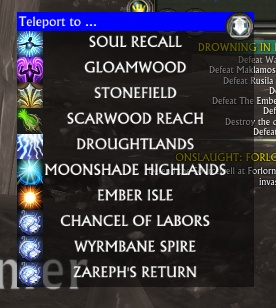
PicturesFile InfoUpdated: 11-08-14 04:19 AM Created: 07-25-12 01:09 PM Downloads: 5,762 Favorites: 44 MD5: Teleporter gathers all your teleport abilities and items into one place.Teleporter
The teleporter button has two states - grey (unlocked, can be moved), blue (locked, cannot be moved).
Right-clicking on the teleporter button will toggle between locked and un-locked states.
If the button is locked, then the popup menu of teleports is accessible.
This is done (depending on mode) by either:
- Moving the mouseover the button (the default)
- Left-Clicking the button
The top line of the popup menu has an icon on the right hand side, clicking on the icon will change modes:
- A mouse icon indicates that it is in CLICK to show mode.
- A hand icon indicates that is is in MOUSEOVER mode.
Using the mousewheel on the button will adjust the scale of the teleporter entries.
Command Line Options:
/teleporter mode - Toggles between popup and rightclick to show teleport abilites
/teleporter align - Cycles through alignment options
/teleporter fade N - Sets the fadeout time when your mouse leaves the popup menu before the menu is removed.
/teleporter reset - Relocates control button to center of screen
Note: If you have Docker installed, then the movement and locking options are inactive - Docker will handle placement of the button.3.00v01.R - Added Planewalker's Call
2.08v01.R - Added Patrons Fast Pass
2.03r7 - Added translations for the remaining untranslated text
- Added /teleporter fade to adjust fade options
- Made popup window fade rather than disappear immediately.
- Rationalised the mouse click options
- Added UI driven mode change
2.03r6 - Use mousewheel on button to change scale
- Performance updates
- Added /teleporter reset - to relocate control button to center of screen
2.03r5 - Add missing entries from .toc
2.03r4 - Added Brevanic Portal Battery + Stronghold Summoner
2.03r3 - Bug fix for Guild Rally banner if you arent in a guild
2.03r2 - Added Summon Guild Rally Banner + Rally Scroll use
2.03r1 - Added Tempest Insignia
2.02r3 - Updated for 2.3 macro system
2.02r2 - Removed some debug information + fixed an item login error
2.02r1 - Converted to 2.2 Event system
- Added T3 PA Group Summon abilities
2.00r2 - Added some nil value protection on popup window
2.00r1 - Added Brevanic Portal Generator
1.10r3 - Minor update to allow hiding of popup when Docker is installed
1.10r2
* Added two command line options
/teleporter mode - Toggles between popup and rightclick to show teleport abilites
/teleporter align - Cycles through alignment options (replaces previous right-click button option)
* Changed minimap icon
* Icon can be locked in place (hold left click + press right button). Locked = color, Unlocked = gray
* Icon can be moved when unlocked
1.10r1 - Add support for Docker
1.9r9 - Small cosmetic change - use the right units if cooldown remaining <1min
1.9r8 - Removed some fixed localisation and replaced data with values generated at runtime from the client.
1.9r7 - Added German localisation
+ Right clicking the minimap icon will alter the positioning of the text - C > R > L > C
1.9r6 - Language fix
1.9r5 - Added French localisation
+ Hopefully prevent the nil comparison operation when keeping the mouse over the teleport after the zone completes
1.9r4 - Shows cooldown time remaining
+ More refinement on item detection/activation
1.9r3 - Added Unseen Insignia item
+ Refined item detection, so should only show the ones you have.
1.9r2 - More reliably (I hope!) detect the artifact teleport devicesArchived Files (27)File NameVersionSizeAuthorDate2.08v01.R26kBadelea09-02-14 01:18 AM2.03r726kBadelea07-03-13 10:38 AM2.03r623kBadelea07-02-13 11:13 AM2.03r522kBadelea07-01-13 12:24 AM2.03r422kBadelea06-30-13 03:45 PM2.03r313kBadelea06-17-13 09:14 AM2.03r213kBadelea06-17-13 01:39 AM2.03r113kBadelea06-14-13 12:18 AM2.02r313kBadelea05-28-13 09:48 AM2.02r213kBadelea03-17-13 05:04 PM2.02r113kBadelea03-17-13 04:44 PM2.00r212kBadelea12-05-12 02:38 AM2.00r112kBadelea11-14-12 04:16 AM1.10r312kBadelea10-05-12 06:53 AM1.10r212kBadelea09-26-12 03:40 AM1.10r18kBadelea09-23-12 02:15 AM1.10r18kBadelea09-23-12 02:10 AM1.9r98kBadelea08-27-12 12:40 AM1.9r88kBadelea08-03-12 07:28 AM1.9r78kBadelea08-01-12 08:47 AM1.9r68kBadelea07-31-12 08:07 AM1.9r58kBadelea07-31-12 12:48 AM1.9r47kBadelea07-28-12 06:53 AM1.9r37kBadelea07-28-12 02:18 AM1.9r26kBadelea07-27-12 10:03 AM1.9r16kBadelea07-25-12 01:09 PM0Badelea01-01-70 12:00 AM

Comment Options  03-21-15, 01:40 AM
Claw of Regulos
03-21-15, 01:40 AM
Claw of Regulos
Forum posts: 22File comments: 285Uploads: 6Ahah!Quote:Originally Posted by twistdshadeHello And thank you very much for all your hard work in creating this addon and all your other rift addons.
I would just like to point out a problem with using the docker addon with this addon.
This and your Rifter addon both pop out from the mouse in different directions. The popup for teleporter appears with the top left of the window under the mouse, so to the left and down from the mouse. The Rifter popup window appears to change direction depending on where the icon is placed, which is great..
Because of this, the docker icon can never be placed on the right or bottom of the screen because the popup windows will appear off of the screen.
Also, when the docker direction is set to UP, the icons for the teleport spells appear under the other docker icons.
So because of these factors, the docker cannot be used at the bottom of the screen, and the UP or DOWN options cannot be used. The only reasonable position is at the top left.
In Teleporter_Main.lua, find the TP.ShowPopup() function - around line 134
Add a call to TP.AttachPopup() so that the function looks like:
It does attach itself on loading so that it appears in a sensible direction, but if you move its location it doesnt detect that and refresh. Rifter on the other hand checks everytime it opens - which is what the above 1 line change will make TP do.Code:function TP.ShowPopup() if (Inspect.System.Secure() == true) or (Teleporter_Settings.locked == false) then return end if MINIMAPDOCKER then MINIMAPDOCKER.AUTOHIDE_DOCKED = false end tpmenuVis = true TP.AttachPopup() UIFrames.frame:SetVisible(true) end
Last edited by adelea : 03-21-15 at 01:41 AM.

 07-18-14, 06:01 PM
Forum posts: 0File comments: 45Uploads: 0[A665FDAC7EDD37636] => Table {
{
[target] => u05510000075F6EBF
[icon] => Data/\UI\item_icons\fatestone_05_neutral_a.dds
[id] => A665FDAC7EDD37636
[idNew] => A665FDAC7EDD37636
[name] => Patron's Fast Pass
[description] => Allows access to remotely enter the porticulum. 30 minute cooldown.
}
06-17-13, 05:33 PM
Forum posts: 0File comments: 26Uploads: 0Re: Re: Re: Love the addon...
Woo! It's addon development, and i helped!Quote:Originally Posted by adeleaAnd added in 2.03r2
06-17-13, 01:40 AM
Claw of Regulos
Forum posts: 22File comments: 285Uploads: 6Re: Re: Love the addon...
And added in 2.03r2Quote:Originally Posted by adeleaYeah, they would fit - will add them in!Quote:Originally Posted by rakasha681Definitely comes in handy to free up a cluttered screen! One thing that would be cool, is having the guild rally banner and scroll's in there too
06-16-13, 11:30 AM
Claw of Regulos
Forum posts: 22File comments: 285Uploads: 6Re: Love the addon...
Yeah, they would fit - will add them in!Quote:Originally Posted by rakasha681Definitely comes in handy to free up a cluttered screen! One thing that would be cool, is having the guild rally banner and scroll's in there too
06-16-13, 11:23 AM
Forum posts: 0File comments: 26Uploads: 0Love the addon...
Definitely comes in handy to free up a cluttered screen! One thing that would be cool, is having the guild rally banner and scroll's in there too
06-13-13, 12:42 PM
Forum posts: 0File comments: 45Uploads: 0[/script] {bind = "pickup", bound = true, category = "consumable potion", cooldown = 3600, icon = "Data/\\UI\\item_icons\\totem_air_mundane.dds", id = "i0548000020F0CE55", name = "Tempest Insignia", rarity = "epic", type = "I4D97EE3EB79275CD,7EB547DFB8F5C0A7,,,,,,"}
05-25-13, 11:03 AM
Forum posts: 0File comments: 9Uploads: 0Breaks on load on PTS. 2.3 build I believe:
Error: Teleporter/Teleporter_Main.lua:534: Error in coroutine: Incorrect function usage.
Parameters: (Frame: Teleporter.f.frame.0x2c925fa8), (userdata: ), "cast Soul Recall", "Event.UI.Input.Mouse.Left.Click"
Parameter types: Frame, eventFrame, string, string
Function documentation:
Attaches an event handler to an event.
Not permitted on a frame with "restricted" SecureMode while the addon environment is secured.
Layout:EventAttach(handle, callback, label) -- eventFrame, function, string
Layout:EventAttach(handle, callback, label, priority) -- eventFrame, function, string, number
Parameters:
callback: A global event handler function. This will be called when the event fires. The first parameter will be the standard frame event handle, any other parameters will follow that.
handle: A handle to a frame event, usually pulled out of the "Event.UI." hierarchy.
label: Human-readable label used to identify the handler in error reports, performance reports, and for later detaching.
priority: Priority of the event handler. Higher numbers trigger first.
In Teleporter / Event.System.Update.Begin, event Event.System.Update.Begin
stack traceback:
[C]: ?
[C]: in function 'error'
Teleporter/Teleporter_Main.lua:534: in function <Teleporter/Teleporter_Main.lua:529>
11-14-12, 02:48 AM
Forum posts: 0File comments: 45Uploads: 0[/script] {bind = "pickup", bound = true, category = "misc", cooldown = 3600, icon = "Data/\\UI\\item_icons\\fatestone_05_neutral_a.dds", id = "i0548000008E03CE7", name = "Brevanic Portal Generator", rarity = "epic", type = "IFAFB17B78F862295,2372E487E1EDD0FA,,,,,,"}
09-21-12, 11:34 AM
Forum posts: 0File comments: 50Uploads: 0Wow, no idea how I didn't see that. Think my brain just focused on the big red bar that shows up and expected the timer to be inside the tinted window/that big red bar to be the timer itself.
09-17-12, 01:40 PM
Claw of Regulos
Forum posts: 22File comments: 285Uploads: 6There is a timer - red text to the left of the icon.Quote:Originally Posted by AlienFromBeyondWould it be possible to have the menu only show up when you click the button instead of hover over it? Can be pretty annoying to have it show up when randomly moving my mouse around while waiting to respawn/preparing in raid or PvP. Thankfully you have it not show up during combat which is nice.
EDIT: A timer for the cooldown on the teleports would be great as well.
I'll see what I can do about the popups.
08-30-12, 05:33 PM
Forum posts: 0File comments: 50Uploads: 0Would it be possible to have the menu only show up when you click the button instead of hover over it? Can be pretty annoying to have it show up when randomly moving my mouse around while waiting to respawn/preparing in raid or PvP. Thankfully you have it not show up during combat which is nice.
EDIT: A timer for the cooldown on the teleports would be great as well.Last edited by AlienFromBeyond : 09-11-12 at 01:20 PM.
07-31-12, 08:08 AM
Claw of Regulos
Forum posts: 22File comments: 285Uploads: 6If you mean what I think you mean, then it's not me missing off the ends of the letters -the available space goes all the way to the edges, the client is doing that.Quote:Originally Posted by topilandfix is ok
small error on language setting
you reinitalize the moonsshade name, so even english its showing french name:
shared.lang["MOONSHADE HIGHLANDS"] = "Hautes-Terres d'Ombrelune"
second for french names windows text width to small
07-31-12, 06:43 AM
Forum posts: 0File comments: 45Uploads: 0fix is ok
small error on language setting
you reinitalize the moonsshade name, so even english its showing french name:
shared.lang["MOONSHADE HIGHLANDS"] = "Hautes-Terres d'Ombrelune"
second for french names windows text width to small
- Categories









Riftui
AddOn Sites

© 2022 MMOUI