
- AddOns
- Categories
- Stand-Alone Addons
- Action Bar
- Auction House
- Bags, Bank, Inventory
- Buff, Debuff, Spell
- Casting Bars, Cooldowns
- Chat
- Combat
- Graphics, Artwork, Textures
- Layouts
- Map, Coords, Compasses
- Party, Guild
- Professions
- PvP, Warfronts
- Quest, Leveling, Reputation
- Raid Mods
- RolePlay, Music Mods
- Soul and Role Specific
- ToolTip
- Unit Frames
- Miscellaneous
- Compilations & Suites
- Developer & Utilities
- Optional
- Stand-Alone Addons
- Latest 200 Submissions
- Upload AddOn
- Community
- Forums
 »
Gadgets: Buffs
PicturesFile Info
»
Gadgets: Buffs
PicturesFile InfoUpdated: 06-15-13 05:38 AM Created: 08-05-12 02:45 PM Downloads: 11,285 Favorites: 61 MD5: For now, please see here for details on this addon.Gadgets: Buffs
v0.4.0-beta: Changed outline to use new glow effect for efficiency
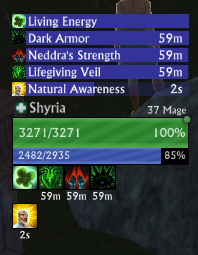
Buff Bars
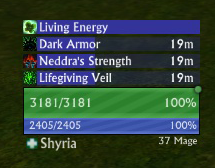
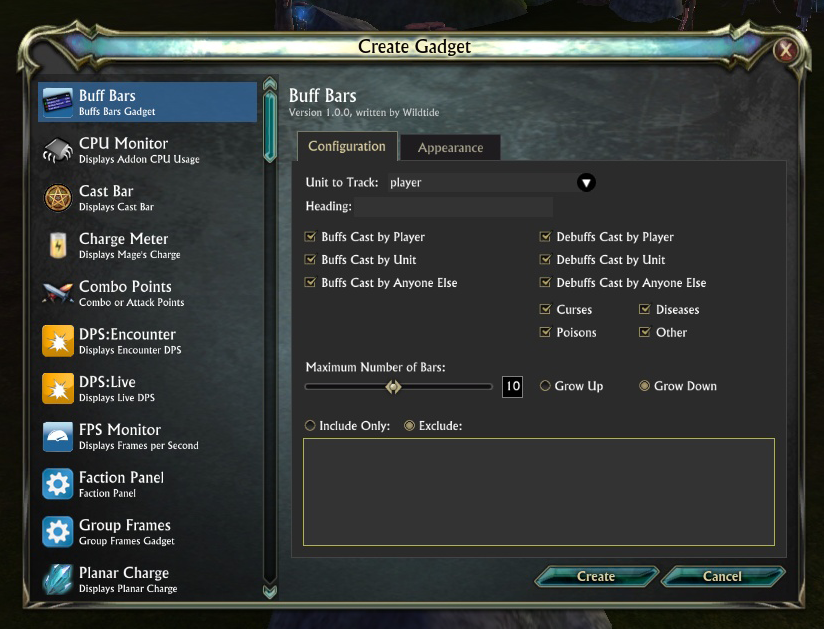
Provides configurable sets of buff timer bars, with the following options:
Show buffs cast by player, unit or anyone else
Show debuffs cast by player, unit or anyone else
Show curses/diseases/poisons/other types of debuff
Hide permanent buffs
Show only buffs with less than 'n' seconds remaining
Include/Exclude specific buffs/debuffs by name
Set the colour of buff/debuff bars
Set the colour of buff/debuff bar background
Set the colour of buff/debuff bar text
Set the spacing between each bar
Set the bars to grow upwards or downwards
Sort bars by time remaining, in ascending or descending order
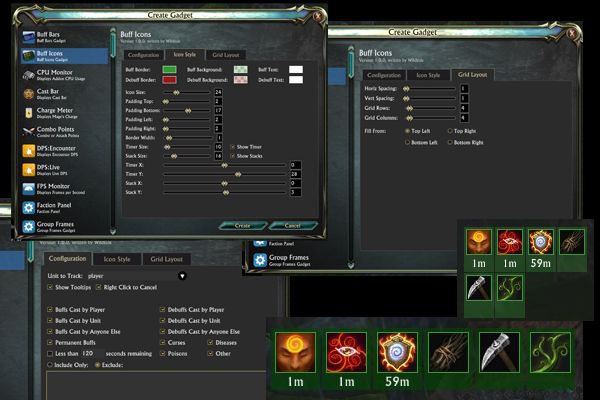
Buff Icons
A configurable panel of buff icons. Lots of options on this one, I'll get a proper description written at some point!v0.1.2
Wykkyd's logic fix applied for buff/debuff display filters
v0.1.4-beta/v0.1.5
Ability to hide permanent buffs
Ability to hide buffs with more than 'n' seconds remaining
Ability to sort ascending/descending
Ability to alter the colour of buff/debuff bars, backgrounds and text
Ability to adjust the spacing between barsOptional Files (0)
Archived Files (12)File NameVersionSizeAuthorDate0.4.1-beta44kBWildtide06-14-13 12:32 AM0.4.0-beta44kBWildtide06-13-13 05:30 PM0.1.1044kBWildtide10-17-12 01:24 AM0.1.944kBWildtide09-17-12 01:34 AM0.1.844kBWildtide08-22-12 12:23 AM0.1.744kBWildtide08-20-12 05:32 PM0.1.643kBWildtide08-20-12 01:53 PM0.1.527kBWildtide08-16-12 01:20 AM0.1.319kBWildtide08-06-12 07:28 PM0.1.217kBWildtide08-06-12 01:13 AM0.1.117kBWildtide08-05-12 04:23 PM0.1.017kBWildtide08-05-12 02:45 PM

Comment Options  01-27-14, 12:28 PM
Forum posts: 0File comments: 1Uploads: 0Any chance that we get the option of removing the ability Icons again, somehow last update removed that option


 10-27-13, 11:15 AM
Forum posts: 0File comments: 4Uploads: 0I let me show purges. I need to adjust?
08-04-13, 06:01 AM
Forum posts: 0File comments: 4Uploads: 0would be awesome if you could somehow allow it track cooldowns on abilities (unless it can already, if so, did i miss something? )
)
06-27-13, 02:38 PM
Forum posts: 0File comments: 9Uploads: 0How does the format in the Include/Excluse box work? Have tried adding buffs with return seperating, comma seperating and semi-colon seperating. The excludes still appear on the buff icon panel...
Nvm got it to work, not sure why it wasn't previously...return is the answer.Last edited by Mangoes : 06-27-13 at 03:05 PM.
06-21-13, 12:27 AM

Forum posts: 0File comments: 155Uploads: 6Is that a specific buff causing the problem? If it is, could you let me know which one?Quote:Originally Posted by corthreatUsing the latest Gadgets + Gadgets Buffs
I'll have to catch the error and handle it, but it's a strange one.
06-20-13, 05:09 PM
Forum posts: 0File comments: 5Uploads: 0Using the latest Gadgets + Gadgets Buffs
Error: Incorrect function usage.
Parameters: "player.target", "b800000039A114468"
Parameter types: unit, buff
Function documentation:
Changes the displayed tooltip.
Command.Tooltip(target) -- variant
Command.Tooltip(target, nil) -- variant, nil
Command.Tooltip(owner, buff) -- unit, buff
Parameters:
buff: The ID of a buff for the new tooltip.
nil: Optional placeholder nil.
owner: The ID of the owner of the buff.
target: The new tooltip. Currently accepts ability, item, itemtype, or unit IDs. Pass nil to clear the tooltip.
In wtLibCore / wtLibCore.barBackground:MouseIn
stack traceback:
[C]: in function 'Tooltip'
Gadgets_Buffs/wtBuffTooltip.lua:23: in function 'ShowBuffTooltip'
Gadgets_Buffs/wtBuffBars_Renderer.lua:306: in function <Gadgets_Buffs/wtBuffBars_Renderer.lua:304>Last edited by corthreat : 06-20-13 at 05:12 PM.
03-02-13, 12:36 PM
Forum posts: 0File comments: 155Uploads: 6There's another odd bug in the addon API. It's something to do with UI scaling, but basically, RIFT thinks text boxes are somewhere different to where they really are. Zorba is aware and is fixing it - unfortunately there's nothing I can do to fix this myselfQuote:Originally Posted by SynaxI can't seem to type (or even really click) on anything in the Include Only/Exclude box when modifying or creating a timer since last patch.
The addon works fine, no errors, but I just can't seem to do anything in that box, although moving the slide bar up and down to see the previous buffs I wrote in there works.
Using the latest Gadget & Gadget:Buffs.
Besides that, love the addon, can't imagine playing without it!
03-01-13, 11:22 PM
Forum posts: 0File comments: 1Uploads: 0I can't seem to type (or even really click) on anything in the Include Only/Exclude box when modifying or creating a timer since last patch.
The addon works fine, no errors, but I just can't seem to do anything in that box, although moving the slide bar up and down to see the previous buffs I wrote in there works.
Using the latest Gadget & Gadget:Buffs.
Besides that, love the addon, can't imagine playing without it!
02-28-13, 07:58 PM
Forum posts: 0File comments: 2Uploads: 0Seems to work great, Ty for the the quick update.Quote:Originally Posted by WildtideHopefully v0.3.100 will fix this. They removed a function from Lua that I was using. I've replaced it now.Quote:Originally Posted by haprua3kAs of 2.2 I can no longer create new or modify existing timers. Love this addon. I hope there is continued development for it.
02-28-13, 06:16 PM
Forum posts: 0File comments: 155Uploads: 6Hopefully v0.3.100 will fix this. They removed a function from Lua that I was using. I've replaced it now.Quote:Originally Posted by haprua3kAs of 2.2 I can no longer create new or modify existing timers. Love this addon. I hope there is continued development for it.
02-28-13, 02:13 PM
Forum posts: 0File comments: 2Uploads: 0As of 2.2 I can no longer create new or modify existing timers. Love this addon. I hope there is continued development for it.
01-17-13, 04:46 AM
Forum posts: 0File comments: 155Uploads: 6Yep, Zorba is aware and working on a fix. I should be able to put a workaround in as well. Any text that changes dynamically, like the buff timers, is affected.Quote:Originally Posted by AlienFromBeyondThe latest hotfix seems to have screwed up the text something fierce. Which is odd because the Gadgets unit frames are just fine.
01-16-13, 02:04 PM
Forum posts: 0File comments: 50Uploads: 0The latest hotfix seems to have screwed up the text something fierce. Which is odd because the Gadgets unit frames are just fine.
11-24-12, 05:00 PM
Forum posts: 0File comments: 4Uploads: 0Thanks for the reply.Quote:Originally Posted by WildtideAh, the font size is dependent on the height of the bar, which is set by resizing the buff bars gadget. I haven't provided a way to alter the size of the font independently, though it sounds like I should probably add this.Quote:Originally Posted by ZedFighterBuffbar setup as debuffs only (bar on left with the giant 3). As you can see the text is ginormous and I've not figured a way to shrink it =\

All the fonts should have at least minor settings such as size and color. That would be a wonderful addition
I believe the big 3 is the stack count. And it would be more sensible to have that directly on the icon. It seems to be missing the "Icon Layout" and "Grid Layout" options similar to those used above the unit frame.
11-24-12, 02:43 PM
Forum posts: 0File comments: 155Uploads: 6Ah, the font size is dependent on the height of the bar, which is set by resizing the buff bars gadget. I haven't provided a way to alter the size of the font independently, though it sounds like I should probably add this.Quote:Originally Posted by ZedFighterBuffbar setup as debuffs only (bar on left with the giant 3). As you can see the text is ginormous and I've not figured a way to shrink it =\
- Categories







 )
)

Riftui
AddOn Sites

© 2022 MMOUI