
- AddOns
- Categories
- Stand-Alone Addons
- Action Bar
- Auction House
- Bags, Bank, Inventory
- Buff, Debuff, Spell
- Casting Bars, Cooldowns
- Chat
- Combat
- Graphics, Artwork, Textures
- Layouts
- Map, Coords, Compasses
- Party, Guild
- Professions
- PvP, Warfronts
- Quest, Leveling, Reputation
- Raid Mods
- RolePlay, Music Mods
- Soul and Role Specific
- ToolTip
- Unit Frames
- Miscellaneous
- Compilations & Suites
- Developer & Utilities
- Optional
- Stand-Alone Addons
- Latest 200 Submissions
- Upload AddOn
- Community
- Forums
 »
Rifter
PicturesFile Info
»
Rifter
PicturesFile InfoUpdated: 07-04-13 03:04 PM Created: 09-24-12 03:32 AM Downloads: 4,828 Favorites: 28 MD5: Rifter: Gathers all your rift summoning abilities and items into one place.Rifter
The rifter button has two states:
The left grayscale image is shown when the button is unlocked (moveable), and the right image when the button is locked.
Right-clicking on the button will toggle between locked and unlocked states.
Note: If you have Docker installed, then the movement and locking options are disabled, and Docker manages the positioning of the icon.
If the button is locked, then the popup menu is accessible.
This is done (depending on mode) by either:
- Moving the mouseover the button (the default)
- Left-Clicking the button
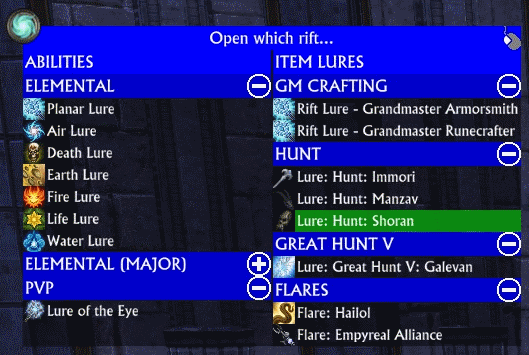
The top line of the popup menu has an icon on the right hand side, clicking on the icon will change modes:
- A mouse icon indicates that it is in CLICK to show mode.
- A hand icon indicates that is is in MOUSEOVER mode.
There +/- icon at the end of each category line will expand/collapse the entries in the category.
Using the mousewheel on the button will adjust the scale of the Rift entries.
Command Line Options:
/rifter mode - Toggles between popup and rightclick to show popup menu.
/rifter show - Toggles between showing available or all abilities/items.
/rifter fade N - Sets the fadeout time when your mouse leaves the popup menu before the menu is removed.
/rifter reset - Relocates control button to center of screen.2.03r6 - Fixed some reference data, so some optimizations could be done
- Updated inventory handling to use libInventory
- Protected various functions that could cause a secure frame error
- Added fade and /rifter fade N command to control timer
- Added /rifter reset - to reset locations
2.03r5 - Delay creation of macros until out of combat. Should fix Error: Rifter/Rifter_Main.lua:658: Error in coroutine: Incorrect security mode.
2.03r4 - Updated item types after they changed for expert and T1 raid lures
- Added Empyreal and Haliol Flares
- /rifter show - now works
2.03r3 - Added Defiant PVP Lure of the Unseen
2.03r2 - Fixed a typo/bug
2.03r1 - Updated for new event system
- Should work for all languages
2.01r1 - Added Major Hunt, Grandmaster Crafting and SL Raid lures
2.00r1 - Added all Hunt lures to Items section
- Removed show all/avail - only shows available
- Fixed a reported error
1.11r1 - Added missing crafting lures
1.10r7 - Minor update to allow hiding of popup when Docker is installed
1.10r6 - Added a command line switch: /rifter show
This toggles between showing ALL abilities/lures and AVAILABLE abilities/lures
NOTE: Currently not all CRAFTING lures supported (only Apo / Armor / Rune)
1.10r5 - Moved major lures to their own category
- Each category can be rolled up/down by clicking the icon on the header
1.10r4 - Added crafting lures
- Added a command line switch: /rifter mode
This toggles between POPUP and RIGHT-CLICK to display the rift selection
1.10r3 - The other half of the 1.10r2 fix
1.10r2 - Fix an error on first login
1.10r1 - Initial releaseArchived Files (15)File NameVersionSizeAuthorDate2.03r546kBadelea06-25-13 02:59 AM2.03r446kBadelea06-20-13 05:15 PM2.03r344kBadelea06-20-13 06:37 AM2.03r244kBadelea06-20-13 03:57 AM2.01r138kBadelea12-15-12 03:25 AM2.00r137kBadelea12-09-12 07:40 AM1.11r135kBadelea11-06-12 04:04 AM1.10r735kBadelea10-05-12 06:51 AM1.10r635kBadelea09-28-12 03:48 AM1.10r534kBadelea09-27-12 03:45 AM1.10r411kBadelea09-26-12 02:08 AM1.10r311kBadelea09-25-12 04:21 AM1.10r211kBadelea09-25-12 01:33 AM1.10r110kBadelea09-24-12 03:32 AM0Badelea01-01-70 12:00 AM

Comment Options  07-05-13, 12:33 PM
Claw of Regulos
07-05-13, 12:33 PM
Claw of Regulos
Forum posts: 22File comments: 285Uploads: 6Frames with macro's on them (which is what we use in order to actually use an item or cast a spell) cannot be changed in combat.Quote:Originally Posted by FlimFlam69There a reason why, when I am in combat, if I hover over the button, none of the options are available? Makes it tough to Summon group when in a GHR and use Guild Summon banners or even Teleport Scroll to get to guild rally banner...
Changed is a broad term - and it includes going from hidden to unhidden.
So, to prevent that from happening (and throwing lots of errors in the process), I dont allow the frames to be shown in combat.
I could change it, so that you couldnt change the state in combat - but then the whole popup would have to stay visible and in its same location for the whole fight.
This would be quite annoying I think!

 07-05-13, 10:40 AM
Forum posts: 0File comments: 2Uploads: 0There a reason why, when I am in combat, if I hover over the button, none of the options are available? Makes it tough to Summon group when in a GHR and use Guild Summon banners or even Teleport Scroll to get to guild rally banner...
09-26-12, 01:08 PM
Forum posts: 0File comments: 50Uploads: 0Glad I could help.Quote:Originally Posted by adeleaNow THAT is a good idea! I'll make the section headers collapsible.
09-26-12, 11:50 AM
Claw of Regulos
Forum posts: 22File comments: 285Uploads: 6Now THAT is a good idea! I'll make the section headers collapsible.Quote:Originally Posted by AlienFromBeyondWell that sucks. Though showing all lures may get to be a bit unwieldy come Storm Legion, which is why I suggested maybe not bothering with detecting the lures but at least being able to enable/disable certain categories of lure from showing at all. You could even do something cute like clicking on the category name collapses/expands that category. Then you could walk around with the ones you use most open, but if you're doing a bunch of EI raid rifts as a guild you can open that section.Quote:Originally Posted by adeleaWell, it turns out its even worse - detecting the different lure abilities is inconsistent - so some I cant tell if you have or not.
09-26-12, 11:29 AM
Forum posts: 0File comments: 50Uploads: 0Well that sucks. Though showing all lures may get to be a bit unwieldy come Storm Legion, which is why I suggested maybe not bothering with detecting the lures but at least being able to enable/disable certain categories of lure from showing at all. You could even do something cute like clicking on the category name collapses/expands that category. Then you could walk around with the ones you use most open, but if you're doing a bunch of EI raid rifts as a guild you can open that section.Quote:Originally Posted by adeleaWell, it turns out its even worse - detecting the different lure abilities is inconsistent - so some I cant tell if you have or not.
09-26-12, 04:54 AM
Claw of Regulos
Forum posts: 22File comments: 285Uploads: 6This has been added (and to teleporter too)Quote:Originally Posted by AlienFromBeyondIt's more I just don't like mouseover stuff in general. Just personal preference.
Well, it turns out its even worse - detecting the different lure abilities is inconsistent - so some I cant tell if you have or not.Quote:Originally Posted by AlienFromBeyondHmm, I can see how that would be a pain in the ass then. Suppose you could make a simple command line option for this as well, between Show All Lures, Show Only Ability Lures, and Show Only Item Lures (hey, there could possibly be someone who wants that third option?).
Thanks for your addons though. Now if only we could get a minimap addon so I don't have the stupid zoom out/in/filter/world map buttons so I could fit Docker there instead...
So, given this, and given that opening lures isnt something you do every 5 minutes all day, I think leaving it as-is is something that we can live with!
I will put scaling functions on the icon, so you can at least make it smaller if you wish. (this will be in the next release)
09-25-12, 03:14 PM
Forum posts: 0File comments: 50Uploads: 0It's more I just don't like mouseover stuff in general. Just personal preference.Quote:Originally Posted by adeleaPut the button somewhere you arent likely to mouse over it by accident! =P
I will add a commandline option to toggle the behaviour from mouseover to click.
Hmm, I can see how that would be a pain in the ass then. Suppose you could make a simple command line option for this as well, between Show All Lures, Show Only Ability Lures, and Show Only Item Lures (hey, there could possibly be someone who wants that third option?).Quote:Originally Posted by adeleaHiding lure abilities you dont have is easy enough, but items....
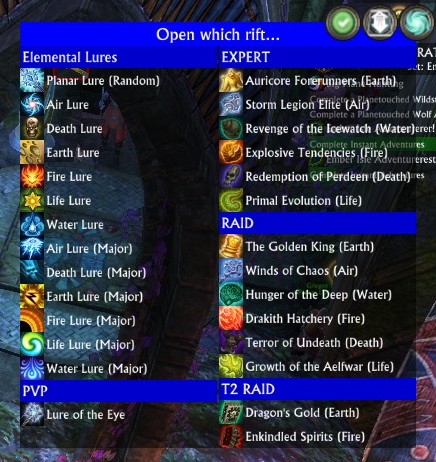
Its even worse with raid/expert lures which are consumable, since I would have to check your inventory every time you popup the window, and then resize it etc.
So having gone with the decision to NOT check for lure items, I left all the abilities in to keep the popup balanced.
But I will revisit it, and see how much work it would be to do.
Thanks for your addons though. Now if only we could get a minimap addon so I don't have the stupid zoom out/in/filter/world map buttons so I could fit Docker there instead...
09-25-12, 02:06 PM
Claw of Regulos
Forum posts: 22File comments: 285Uploads: 6Put the button somewhere you arent likely to mouse over it by accident! =PQuote:Originally Posted by AlienFromBeyondCould you have this only show lures you actually have like Teleporter does? I don't carry around any of the expert or raid lures so it's basically twice as big for me as I need. I also wish to reiterate that an option to have it open on mouse click instead of mouseover would really be appreciated!
Funny thing is that I was about to suggest an addon like this to you since I've been using so many different elemental lures lately because of the world event.
I will add a commandline option to toggle the behaviour from mouseover to click.
The reason I didnt have it only show the ones you have, is that I learned from teleporter that managing that is a right pain in the ass!
Hiding lure abilities you dont have is easy enough, but items....
Its even worse with raid/expert lures which are consumable, since I would have to check your inventory every time you popup the window, and then resize it etc.
So having gone with the decision to NOT check for lure items, I left all the abilities in to keep the popup balanced.
But I will revisit it, and see how much work it would be to do.
09-25-12, 01:12 PM
Forum posts: 0File comments: 50Uploads: 0Could you have this only show lures you actually have like Teleporter does? I don't carry around any of the expert or raid lures so it's basically twice as big for me as I need. I also wish to reiterate that an option to have it open on mouse click instead of mouseover would really be appreciated!
Funny thing is that I was about to suggest an addon like this to you since I've been using so many different elemental lures lately because of the world event.
09-25-12, 05:24 AM
Forum posts: 0File comments: 18Uploads: 0yep that did itQuote:Originally Posted by adeleaSeems only half of the fix made it - 1.10r3 should fix the fix!Quote:Originally Posted by adeleaIs that w/ the 1.10r1 or 1.10r2 version?
That is the error that 1.10r2 should have fixed __________________
09-25-12, 04:21 AM
Claw of Regulos
Forum posts: 22File comments: 285Uploads: 6Seems only half of the fix made it - 1.10r3 should fix the fix!Quote:Originally Posted by adeleaIs that w/ the 1.10r1 or 1.10r2 version?
That is the error that 1.10r2 should have fixed
09-25-12, 04:07 AM
Claw of Regulos
Forum posts: 22File comments: 285Uploads: 6Is that w/ the 1.10r1 or 1.10r2 version?
That is the error that 1.10r2 should have fixed
09-25-12, 03:57 AM
Forum posts: 0File comments: 18Uploads: 0got this error after downloading the addon.
Code:Error: Rifter/Rifter_Main.lua:364: Error in coroutine: Rifter/Rifter_Main.lua:239: attempt to index a nil value In Rifter / Event.System.Update.Begin, event Event.System.Update.Begin stack traceback: [C]: in function 'error' Rifter/Rifter_Main.lua:364: in function <Rifter/Rifter_Main.lua:359>__________________
- Categories








Riftui
AddOn Sites

© 2022 MMOUI