
- AddOns
- Categories
- Stand-Alone Addons
- Action Bar
- Auction House
- Bags, Bank, Inventory
- Buff, Debuff, Spell
- Casting Bars, Cooldowns
- Chat
- Combat
- Graphics, Artwork, Textures
- Layouts
- Map, Coords, Compasses
- Party, Guild
- Professions
- PvP, Warfronts
- Quest, Leveling, Reputation
- Raid Mods
- RolePlay, Music Mods
- Soul and Role Specific
- ToolTip
- Unit Frames
- Miscellaneous
- Compilations & Suites
- Developer & Utilities
- Optional
- Stand-Alone Addons
- Latest 200 Submissions
- Upload AddOn
- Community
- Forums
 »
ResourceTracker
PicturesFile Info
»
ResourceTracker
PicturesFile InfoUpdated: 10-31-14 03:40 PM Created: 01-21-13 06:58 AM Downloads: 20,105 Favorites: 60 MD5: I wrote this addon when levelling Foraging - since it was annoying to me to keep checking what the icons on the minimap were.ResourceTracker
If you have Docker installed, it will place an icon in the Dock.
If you do not have Docker, it will place an icon somewhere in the topleft of the screen.
The icon is a silver diamond on a minimap style button. The button will initially be gray, and can be moved around by dragging.
Once it is in place, RIGHT CLICK the button, and it will gain some color.
At this point, the configuration screen can be accessed by LEFT CLICKing the button.
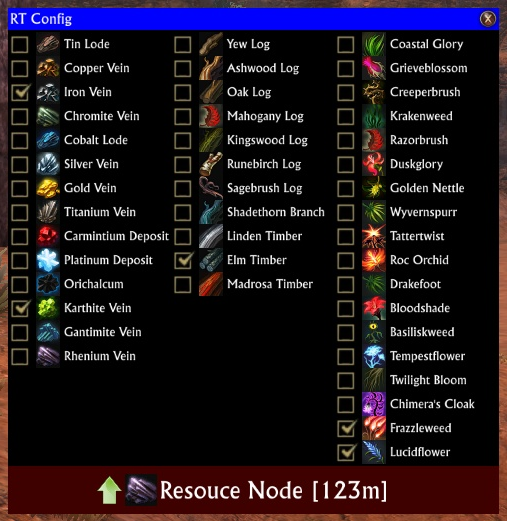
This will display the RT Config screen, which lists all Mining/Foraging/Fishing node types.
Use the checkboxes to select which you are interested in seeing notifications for.
At the bottom of the config screen, is a dark red box, showing an arrow, a resource and some text.
Using the mousewheel on this red section will change the size of the font used.
When the configuration screen is visible, there will also be another blue bar shown, labelled 'Resource Tracker'
This is the anchor for where the alerts will appear. This can be moved around by dragging the blue bar.
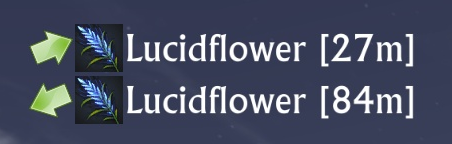
The arrow will be green or red (red indicates that the node is significantly above or below you)
There may be up to 4 icons above the tracking data - if these are visible it is becuase you are tracking a node type you dont have the corresponding Track buff active for.
There is a a /resourcetracker command option, though it only takes the parameter 'reset' - which is used to reset all UI elements to near the top left of the screen - in case they go missing.3.00v02.R:
- Removed some debug message spam
3.00v01.R:
- Added Thalasite / Sarleaf nodes (EN only - other clients will need to edit these values)
- Editing local names of items should work better
- Added exclusions to artifact tracking
- In ghostmode, right clicking the boxes will exclude any node where that node type has been seen
- Can hide known common locations
- If you are getting errors, try using /resourcetracker saved
2.08v11.R:
- Fixed an error when changing zones by running across a border
2.08v10.R:
- Added a new slash command: /resourcetracker config - to open up the config screen
- Hopefully fixed some of the nil errors around Nodes.Rarity
2.08v09.R:
- Fix for error when closing config screen
2.08v08.R:
- Updated configuration screen
- Removed seperate language config + button
- On each gathering tab, each node has an edit button - left click to edit the text. Left click again to cancel, or right click to save the changes.
- Added in Artifact Ghostmode - lets put that saved artifact location data to use!
- Ghostmode will add in "ghost" artifact nodes - locations of artifacts you have either seen via the track potions, or have harvested from.
You can configure which nodes show up based on node type, or rarity you have harvested from the node.
See the various options on the Artifacts tab.
NOTE: This isnt 'exact' - it will take you to the 5m x 5m x 5m volume of space where you were standing when you harvest, or where you saw the artifact.
2.08v07.R:
- *sigh* fixed a case problem
2.08v06.R:
- Add missing LibInventory embedded library
2.08v05.R:
- And some more fixes for non English languages. I think I need to redo/simplify how I handle non-English =)
2.08v04.R:
- Fix for non English languages
2.08v03.R:
- Track, and optionally color artifact directions with best artifact rarity harvested at location
2.08v02.R:
- Only try and send updates to LibMapNotes, if LibMapNotes is installed!
2.08v01.R:
- Seperated out the different artifacts types for tracking
- Clicking the UK flag in the top left corner opens a window for updating any/all names of nodes
2.05v01.R
- Added DE/FR/RU language support for Artifacts
RU: Артефакт, Искаженный артефакт or any gatherable with: Артефакт or артефакт in its name
DE: Artefakt, Verdrehtes Artefakt or "Artifact"
FR: Artefact, Artefact altéré or "Artefact"
- Using the mousewheel up/down on the minimap icon will toggle the display of everything else
- Added different icons for above/below (blue are above, red are below, green are +/- 3m of you)
- Added toggle for using 2D or 3D coords for distances
- Added toggle for display of elevation difference (centered on icon)
- Changed the icons for artifacts - normal are whitish, twisted are reddish, and unknown types (ie what the Fae Yule Artifacts would have appeared as) are greenish
- Bumped the max number of trackables to 24
- Corrected DE translation for Sunken Boat
2.04v01.R
- Made tracking text a little bit wider
- Added support for [Twisted] Artifacts
- Updated icon for Mahogany
2.03v05.R
- Added alternate (compact) display mode
2.03v04.R
- Added support for MapPOI to show nodes
2.03r3
- Added final missing French translation for Sunken Boat
- Redid the config screen to use a standard rift window.
2.03r2
- Updated some translations (DE/RU)
- Added visual indicator that you are missing a 'Track XXX' buff - if you have the ability and are trying to track something of that type.
- Added /resourcetracker reset - to reset all movable items to near the top left of the screen
2.03r1
- Updated some translations (DE/RU)
- Removed the 'New Node' message
- Added option for relative direction arrows instead of absolute
2.02r2
- Added Russian translations by Constantine Maron
2.02r1
- Conversion to 2.2 Event system
- Started tracking node locations on the assumption we can one day use them!
2.01r5 - Will now show the closest X nodes to you, rather than a random selection
- Can now hide the tracker in combat if needed
- German language update
2.01r4 - Added Fishing nodes
Removed possibility for invalid order function error
Reduced CPU load
Made number of nodes and time to fade configurable
2.01r3 - Added French/German translations
Fix for possible nil error
2.01r2 - Fixed layout issue with non-default sizes
2.01r1 - Initial release.Archived Files (27)File NameVersionSizeAuthorDate3.00v01.R618kBadelea10-23-14 02:49 AM2.08v11.R612kBadelea09-30-14 08:10 AM2.08v10.R612kBadelea09-29-14 12:30 AM2.08v09.R612kBadelea09-25-14 04:51 AM2.08v08.R612kBadelea09-23-14 04:30 AM2.08v07.R418kBadelea09-08-14 12:50 PM2.08v06.R418kBadelea09-08-14 12:29 PM2.08v05.R366kBadelea09-07-14 03:40 PM2.08v04.R366kBadelea09-07-14 02:25 PM2.08v03.R364kBadelea09-07-14 02:02 PM2.08v02.R356kBadelea09-03-14 11:05 AM2.08v01.R356kBadelea09-02-14 12:40 AM2.05v01.R354kBadelea01-12-14 08:40 AM2.04v01.R354kBadelea09-21-13 04:25 AM2.03v05.R354kBadelea08-10-13 01:24 AM2.03v04.R352kBadelea07-27-13 11:00 AM2.03r3352kBadelea07-04-13 06:55 AM2.03r2352kBadelea07-03-13 04:17 PM2.03r1344kBadelea06-25-13 04:27 AM2.02r2344kBadelea06-06-13 05:20 AM2.02r1342kBadelea03-07-13 01:38 PM2.01r5339kBadelea02-03-13 03:24 AM2.01r4338kBadelea01-29-13 04:13 AM2.01r3338kBadelea01-25-13 01:32 PM2.01r2336kBadelea01-22-13 06:16 AM2.01r1336kBadelea01-21-13 06:58 AM0Badelea01-01-70 12:00 AM

Comment Options  09-09-19, 05:22 AM
Forum posts: 0File comments: 1Uploads: 0Update code?
I know many are still using this, as I am.
I was wondering, does anyone know where the code is to update to the latest versions of Rift, to include the nodes found in areas like Utilla and Vastigar Peak?
I found it once, but can't seem to find it again. It was just a few lines of code (cut and paste) and it was working for the new nodes. Does anyone have that code, or the location?

 02-09-18, 12:03 PM
Premium Member
02-09-18, 12:03 PM
Premium Member
Forum posts: 17File comments: 19Uploads: 0Can someone update this please? Thank you!__________________
To be a healer you have to have a pure heart, one that will always think about others before yourself. My fellow man shall not fall as long as I have breathe. Trust me and stand by my side and you shall always be rewarded with life.
01-10-16, 03:39 AM
Forum posts: 0File comments: 1Uploads: 0Error report
Hi the resourcetracker dont work any more
i did re-install Rift after some time from it- so i did get the new version first
v3.00v002.r and it dont show any thing when i try to type in the line
/resoursetracker saved i get this....
Error: ResourceTracker/ResourceTracker.lua:2060: table index is nil
In ResourceTracker / Command.Slash.Register, event Event.Slash.resourcetracker
stack traceback:
[C]: in function '__newindex'
ResourceTracker/ResourceTracker.lua:2060: in function <ResourceTracker/ResourceTracker.lua:2029>
 plz help me out
08-24-15, 07:54 PM
Premium Member
Forum posts: 17File comments: 19Uploads: 0 [Request]
The diamond icon you use for the resource tracker, when it is turned on, can you make the blue color brighter? THanks__________________
To be a healer you have to have a pure heart, one that will always think about others before yourself. My fellow man shall not fall as long as I have breathe. Trust me and stand by my side and you shall always be rewarded with life.
08-24-15, 01:38 PM
Forum posts: 0File comments: 4Uploads: 0Quote:Originally Posted by CustomProfileWould it be possible to add the skill level next to the nodes name in the settings si we know exactly what we need to harvest to level, etc.
yes, can we get this added please!
08-02-15, 06:18 AM
Forum posts: 0File comments: 1Uploads: 0Ok. I installed the latest version a couple of days ago and also noticed the one second lag. Removed this version and tried v2.05v0.1.R and the lag was gone. Reinstalled the latest version and found the problem is Ghost Mode. Unchecking this removes the lag. adelea, could you look into this please?
06-14-15, 02:20 PM
Premium Member
Forum posts: 17File comments: 19Uploads: 0
[Request]
Would it be possible to add the skill level next to the nodes name in the settings si we know exactly what we need to harvest to level, etc.__________________
To be a healer you have to have a pure heart, one that will always think about others before yourself. My fellow man shall not fall as long as I have breathe. Trust me and stand by my side and you shall always be rewarded with life.Last edited by CustomProfile : 08-24-15 at 07:54 PM.
05-31-15, 11:59 PM
Forum posts: 0File comments: 1Uploads: 0Yea, it's a problem in 2.08 and the latest version. I use 2.05 and works perfectly. Unfortunately it doesn't have the new stuffQuote:Originally Posted by artocisHad to disable it, every time I moved I experienced stuttering and there was always the same delay between it. Without the add-on active everything was fine again. Tried the new add the new nodes to the old version but it just throws up weird errors.
Hope it gets fixed.
05-01-15, 10:45 AM
Claw of Regulos
Forum posts: 22File comments: 285Uploads: 6Re: Re: Problem with fishing resource tracking
Yes, the whole point of those red bordered icons is to warn you that you are tracking something that you dont have the relevant buff up for !Quote:Originally Posted by djkobleUpdate: lol, my bad. It turns out I never did a Track Fish since I was so used to having my track icons up there all the time. Once I did that the "bad" icon magically disappeared and fish tracking was working.
04-28-15, 10:50 AM
Forum posts: 0File comments: 4Uploads: 0Re: Problem with fishing resource tracking
Update: lol, my bad. It turns out I never did a Track Fish since I was so used to having my track icons up there all the time. Once I did that the "bad" icon magically disappeared and fish tracking was working.Quote:Originally Posted by djkobleHi,
One of my toons is having a problem with trying to track fishing resources.
Every time I try to configure the fishing portion of the tracker I get a small red fishing icon trimmed in red right above the normal tracking icon area and I am unable to track any fishing resources. If I uncheck any of the tracking options for fish and reload the addon the "bad" icon goes away. But when I try to re-enable with any fishing options checked the bad fishing icon reappears.
I've examined the code but I cannot find where this icon is output to the screen so I am stumped. Any ideas?
Thanks
-djkoble
04-26-15, 08:36 PM
Forum posts: 0File comments: 4Uploads: 0Problem with fishing resource tracking
Hi,
One of my toons is having a problem with trying to track fishing resources.
Every time I try to configure the fishing portion of the tracker I get a small red fishing icon trimmed in red right above the normal tracking icon area and I am unable to track any fishing resources. If I uncheck any of the tracking options for fish and reload the addon the "bad" icon goes away. But when I try to re-enable with any fishing options checked the bad fishing icon reappears.
I've examined the code but I cannot find where this icon is output to the screen so I am stumped. Any ideas?
Thanks
-djkoble
03-22-15, 01:20 PM
Forum posts: 0File comments: 4Uploads: 0Re: Re: question about resource tracker lua code
Thank you adelea. I finally found many (but probably not all) members in an obscure changelog created by the original devs and there was nothing about direction in there...sigh...frustrating. I ran into similar roadblocks when I was fiddling with the speed meter addon to get it to be more accurate. I guess this is not to be. Thanks again.Quote:Originally Posted by adeleaThe problewm here, is that the game doesnt tell you what direction you are facing.Quote:Originally Posted by djkobleHi,
I have been looking around to find out the members of
Inspect.Unit.Detail("player") at line 475 in your code but I can't find
a list of those player members anywhere on line.
Specifically what I am trying to do is to slightly modify your code (or I could ask you...lol) so that if a player rotates in place the relative direction arrows update accordingly. Your code seems to be written to only update when a player moves. Oft times I like to rotate in place toward my next objective when I have finished harvesting the current node. If the Inspector does have member variables that indicate player rotation it would be trivial I think to also update the direction arrows if the rotation has changed.
Thanks,
-djkoble
So, the best I can do, is take two successive locations, and work out the direction from that.
If I could have reliable directions, then you can be sure I would have made the change =)
03-19-15, 02:01 PM
Claw of Regulos
Forum posts: 22File comments: 285Uploads: 6Re: question about resource tracker lua code
The problewm here, is that the game doesnt tell you what direction you are facing.Quote:Originally Posted by djkobleHi,
I have been looking around to find out the members of
Inspect.Unit.Detail("player") at line 475 in your code but I can't find
a list of those player members anywhere on line.
Specifically what I am trying to do is to slightly modify your code (or I could ask you...lol) so that if a player rotates in place the relative direction arrows update accordingly. Your code seems to be written to only update when a player moves. Oft times I like to rotate in place toward my next objective when I have finished harvesting the current node. If the Inspector does have member variables that indicate player rotation it would be trivial I think to also update the direction arrows if the rotation has changed.
Thanks,
-djkoble
So, the best I can do, is take two successive locations, and work out the direction from that.
If I could have reliable directions, then you can be sure I would have made the change =)
03-17-15, 12:17 PM
Forum posts: 0File comments: 4Uploads: 0question about resource tracker lua code
Hi,
I have been looking around to find out the members of
Inspect.Unit.Detail("player") at line 475 in your code but I can't find
a list of those player members anywhere on line.
Specifically what I am trying to do is to slightly modify your code (or I could ask you...lol) so that if a player rotates in place the relative direction arrows update accordingly. Your code seems to be written to only update when a player moves. Oft times I like to rotate in place toward my next objective when I have finished harvesting the current node. If the Inspector does have member variables that indicate player rotation it would be trivial I think to also update the direction arrows if the rotation has changed.
Thanks,
-djkoble
02-05-15, 07:16 PM
Forum posts: 0File comments: 3Uploads: 0Had to disable it, every time I moved I experienced stuttering and there was always the same delay between it. Without the add-on active everything was fine again.
- Categories







 plz help me out
 [Request]

Riftui
AddOn Sites

© 2022 MMOUI